
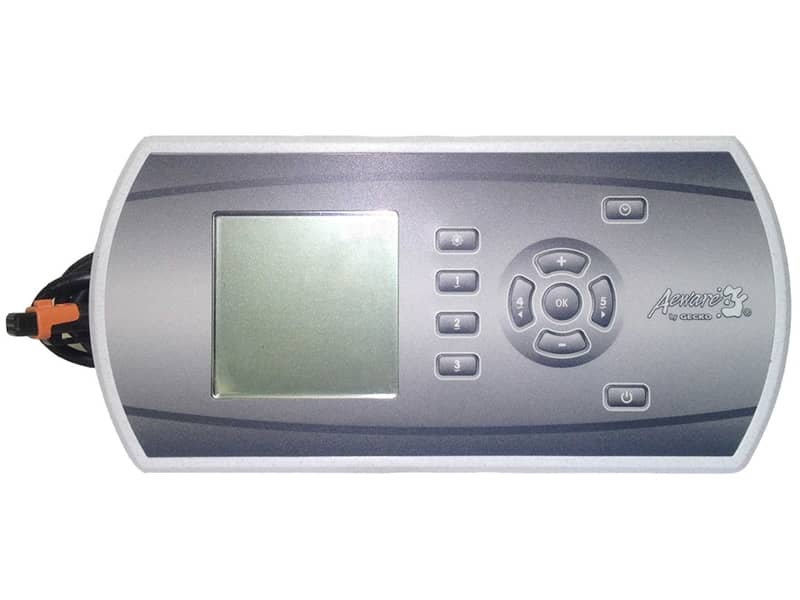
IN.K600 Static Gecko Topside Control
£341.64 Inc VAT
6 in stock
🛁 Gecko IN.K600 Topside Panel (Static) – Premium Eleven-Button Main Control with Segment LCD for IN.XM, IN.XE & IN.Y Systems
The ultimate button-based main topside featuring eleven dedicated function keys, segment LCD display, and three-pump control for comprehensive spa management
📋 Product Overview
The Gecko IN.K600 Topside Panel Static (TS-AE601) represents the pinnacle of button-based spa control in the Gecko range. Featuring eleven dedicated function keys and a segment LCD display, this streamlined panel provides full access to all spa functions and programming without menu navigation – every function has its own dedicated button for instant access.
Measuring an impressive 220 mm × 107 mm, the IN.K600 Static is the largest panel in the Gecko topside range, designed for spas requiring comprehensive control capabilities. Compatible with IN.XM, IN.XE, and IN.Y series spa systems, it offers control of up to three pumps alongside complete temperature management, lighting, and system configuration.
Operating at 12V and connecting via Gecko’s proprietary IN.LINK system, the IN.K600 Static delivers reliable, intuitive control. Quick reference cards for both IN.XE and IN.XM systems plus a drilling template are available for download. Note: This is the Static version – a streamlined panel with dedicated function keys, different from the menu-driven Graphic version.
⭐ Key Features
- ✅ Eleven Dedicated Function Keys – Every function has its own button
- ✅ Segment LCD Display – Clear temperature and status information
- ✅ Streamlined Operation – No menu navigation required
- ✅ Three-Pump Control – Operate up to 3 pump zones
- ✅ Full Programming Access – Complete spa configuration
- ✅ Multi-System Compatible – IN.XM, IN.XE, and IN.Y systems
- ✅ Largest Panel Size – 220 mm × 107 mm
- ✅ IN.LINK Connection – Gecko’s proprietary plug-and-play system
- ✅ 12V Operation – Safe low voltage design
- ✅ Comprehensive Documentation – Quick reference cards for IN.XE and IN.XM, drilling template
⚙️ Technical Specifications
| Specification | Value |
|---|---|
| Manufacturer | Gecko Alliance |
| Model | IN.K600 |
| Variant | Static |
| SKU | TS-AE601 |
| Product Type | Topside Panel (Main) |
| Number of Buttons | 11 |
| Button Type | Dedicated function keys |
| Maximum Pumps Controlled | 3 |
| Blower / Aux | 0 |
| Display Type | Segment LCD / LED Screen |
| Panel Length | 220 mm |
| Panel Height | 107 mm |
| Operating Voltage | 12V |
| Connection Type | IN.LINK |
| Compatible Systems | IN.XM, IN.XE, IN.Y Systems |
| Box Quantity | 12 |
🔌 Compatibility Guide
This Topside Panel is Compatible With:
| Spa Pack Model | Type | Confirmed |
|---|---|---|
| IN.XM | Gecko Spa Pack | ✅ |
| IN.XE | Gecko Spa Pack | ✅ |
| IN.Y | Gecko Spa Pack | ✅ |
NOT Compatible With:
- ❌ Gecko Y Series or X Series (use IN.K1000)
- ❌ Gecko IN.Clear (use IN.K200 In.Clear variant)
- ❌ Balboa systems (BP, GS, GL Series)
- ❌ Other manufacturer spa packs
Connection Requirements:
- Spa pack must be IN.XM, IN.XE, or IN.Y series
- Spa pack must have IN.LINK topside port available
- 12V power supply from spa pack
📍 How to Verify Compatibility:
- Confirm your spa pack is IN.XM, IN.XE, or IN.Y series
- Locate the IN.LINK topside port on your Gecko spa pack
- Check existing topside model if replacing
- Ensure cutout accommodates 220 mm × 107 mm panel
⚠️ Important: The IN.K600 uses Gecko’s proprietary IN.LINK connection. This panel will NOT work with Balboa or other manufacturer systems.
⚠️ Static vs Graphic Version – Important Difference
This is the STATIC version of the IN.K600.
| Feature | Static (This Product) | Graphic Version |
|---|---|---|
| SKU | TS-AE601 | Different SKU |
| Interface | Dedicated function keys | Menu-driven |
| Navigation | Direct button access | Menu navigation |
| in.play Audio/Video | ❌ No | ✅ Yes |
| in.tune Control | ❌ No | ✅ Yes |
| DJS Jet Sequencer | ❌ No | ✅ Yes (IN.XM/XM2 only) |
| Best For | Direct, streamlined control | Advanced multimedia features |
The Graphic version adds complete access to:
- in.play audio or video equipment
- in.tune audio control
- Gecko’s DJS dynamic jet sequencer (only available on IN.XM and IN.XM2)
Choose Static if: You want direct, dedicated button access to all spa functions without menu navigation.
Choose Graphic if: You need multimedia control (in.play, in.tune) or DJS jet sequencer functionality.
🔘 Button Functions & Segment LCD
Eleven-Button Operation:
The IN.K600 Static features eleven dedicated function keys providing instant access to all spa controls. Each button is dedicated to a specific function – no menu navigation required.
Typical Button Functions Include:
- Pump 1 Control
- Pump 2 Control
- Pump 3 Control
- Light Control
- Temperature Up
- Temperature Down
- Mode Selection
- Settings Access
- Additional spa functions
Note: Exact button layout and functions may vary. Refer to the downloadable quick reference cards for your specific system (IN.XE or IN.XM).
Segment LCD Display Features:
| Display Element | Shows |
|---|---|
| Temperature | Current water temperature (segment display) |
| Set Point | Desired temperature when adjusting |
| Status Icons | Heating, filtering, pump indicators |
| Error Codes | System diagnostic messages |
| Mode Indicator | Current operating mode |
| Programming Info | Configuration settings |
Operating Advantages:
- Every function has a dedicated button
- No scrolling through menus
- Instant access to all controls
- Clear segment LCD readout
- Intuitive for all users
🔄 Gecko Main Topside Comparison
How IN.K600 Static Compares:
| Feature | IN.K450 | IN.K500 | IN.K600 Static | IN.K1000 |
|---|---|---|---|---|
| Buttons | 6 | 7 | 11 | Touch |
| Max Pumps | 3 | 2 | 3 | Full |
| Display | LED | LED | Segment LCD | Touchscreen |
| Size (mm) | 181 × 73 | 182 × 85 | 220 × 107 | 190 × 130 |
| Interface | Dedicated | Dedicated | Dedicated | Touch/Menu |
| Compatible | IN.XM/XE/YE | IN.Y | IN.XM/XE/Y | Y/X Series |
Choose IN.K600 Static When:
- You want the most comprehensive button-based control
- You prefer dedicated buttons over menu navigation
- Your spa has IN.XM, IN.XE, or IN.Y system
- You have space for the larger 220 × 107 mm panel
- You don’t need multimedia (in.play/in.tune) features
💡 Eleven-Button Advantage
Why Eleven Dedicated Function Keys?
| Benefit | Description |
|---|---|
| Instant Access | Every function one button press away |
| No Menu Diving | Direct control without navigation |
| User-Friendly | Intuitive for guests and family members |
| Fast Operation | Immediate response to button press |
| Full Control | Access to all spa functions and programming |
| Reduced Errors | Clear, dedicated buttons reduce confusion |
Ideal User Scenarios:
- Commercial spas requiring intuitive guest operation
- Family hot tubs with multiple users of varying tech comfort
- Users who prefer physical buttons over touchscreens
- Installations requiring quick, reliable control access
- Premium spas demanding comprehensive functionality
🎛️ Purpose & Application
What is the IN.K600 Static?
The IN.K600 Static is a premium main topside control panel providing:
- Complete spa function access via dedicated buttons
- Three-pump zone control
- Temperature monitoring and adjustment via segment LCD
- Lighting control
- Full system programming access
- System status and error code display
Premium Panel for Premium Spas:
The IN.K600 Static is designed for installations requiring comprehensive control capabilities with the simplicity of dedicated buttons. The streamlined design gives full access to spa functions and programming without the complexity of menu-driven interfaces.
🛠️ Installation Guide
Before Installation:
- ⚠️ Disconnect power to spa at the isolator/breaker before any work
- ⚠️ Verify your spa pack is IN.XM, IN.XE, or IN.Y series
- ⚠️ Download and use the drilling template
- ⚠️ Ensure cutout location can accommodate 220 mm × 107 mm panel
- ⚠️ Download appropriate quick reference card (IN.XE or IN.XM)
- ⚠️ Plan cable routing to spa pack
Installation Steps:
- Turn off power at the isolator/breaker
- Use the drilling template to mark cutout position
- Prepare cutout for 220 mm × 107 mm panel
- Remove existing topside panel if replacing
- Route cable from installation point to spa pack
- Connect the IN.LINK connector to the spa pack’s topside port
- Mount the IN.K600 Static panel in the prepared cutout
- Ensure watertight seal around panel
- Restore power and test all eleven buttons
Mounting Information:
| Specification | Detail |
|---|---|
| Panel Size | 220 mm × 107 mm |
| Connection | IN.LINK |
| Drilling Template | Available for download |
| Quick Reference (IN.XE) | Available for download |
| Quick Reference (IN.XM) | Available for download |
⚠️ Professional installation recommended for proper mounting, watertight sealing, and electrical safety. The larger panel size requires careful cutout preparation.
🔗 Wiring & Connection
Connector Information:
| Specification | Detail |
|---|---|
| Connector Type | IN.LINK |
| Operating Voltage | 12V |
Connection Location:
The IN.K600 Static connects to the IN.LINK topside port on Gecko IN.XM, IN.XE, and IN.Y series spa packs. As a main topside panel, it connects to the primary topside port.
⚠️ Never force the connector. The IN.LINK plug should connect smoothly. If it doesn’t fit, verify you’re connecting to the correct port on a compatible system.
🔍 Troubleshooting
Common Issues:
| Problem | Possible Cause | Solution |
|---|---|---|
| Segment LCD blank | No power or loose connection | Check power and reseat IN.LINK connector |
| Buttons unresponsive | Connection issue | Check IN.LINK connection |
| Pump 1/2/3 not responding | Pump fault or configuration | Check pump and spa pack settings |
| Incorrect temperature | Sensor issue | Check temperature sensor connection |
| Light not working | Bulb/LED faulty | Check light unit |
| Error codes displayed | Various system issues | Refer to quick reference card |
Error Code Display:
The IN.K600 Static segment LCD displays error codes from the spa pack. Refer to the appropriate downloadable quick reference card (IN.XE or IN.XM version) for specific error code meanings and solutions.
🔩 Maintenance & Care
Routine Care:
| Task | Frequency |
|---|---|
| Wipe with soft damp cloth | Weekly |
| Check all eleven button responses | Monthly |
| Check segment LCD clarity | Monthly |
| Inspect watertight seal | Annually |
DO NOT:
- ❌ Use abrasive cleaners
- ❌ Use solvent-based cleaners
- ❌ Submerge the panel
- ❌ Press buttons with sharp objects
- ❌ Force button operation
♨️ Ideal Applications
| Application | Suitability |
|---|---|
| ♨️ Gecko IN.XM spa systems | ✅ Ideal |
| ♨️ Gecko IN.XE spa systems | ✅ Ideal |
| ♨️ Gecko IN.Y spa systems | ✅ Ideal |
| ♨️ Premium multi-pump spas | ✅ Ideal |
| ♨️ Commercial/guest spas | ✅ Ideal – intuitive operation |
| 🔄 Replacement for faulty IN.K600 Static | ✅ Direct replacement |
| ❌ Spas needing in.play/in.tune control | ❌ Use Graphic version |
| ❌ Compact panel requirements | ❌ Use smaller panel |
| ❌ Balboa systems | ❌ Use Balboa topside |
Common Installation Scenarios:
- 🛁 Premium Gecko spa builds requiring comprehensive control
- 💆 Commercial/rental spas needing intuitive guest operation
- ♨️ Replacing damaged or faulty IN.K600 Static
- 🔄 Upgrading from smaller panel (with compatible system)
❓ Frequently Asked Questions
Q: What is the difference between Static and Graphic versions?
A: The Static version (this product) has eleven dedicated function keys for direct access to all spa controls without menu navigation. The Graphic version is menu-driven and adds access to in.play audio/video, in.tune, and DJS jet sequencer (IN.XM/XM2 only). Choose Static for streamlined, direct control.
Q: Why are there 11 buttons?
A: The eleven dedicated function keys provide instant access to all spa functions – each button controls a specific feature. This eliminates menu navigation and makes operation intuitive for all users.
Q: Is this the largest Gecko topside panel?
A: Yes, the IN.K600 at 220 mm × 107 mm is the largest button-based topside in the Gecko range. Ensure your installation location can accommodate this size.
Q: Which quick reference card do I need?
A: Download the card matching your spa pack: QRC_K600_STA_INXE_EN.pdf for IN.XE systems, or QRC_K600_STA_INXM_EN.pdf for IN.XM systems.
Q: Is my spa compatible?
A: The IN.K600 Static is compatible with Gecko IN.XM, IN.XE, and IN.Y series spa packs. Check your spa pack label to confirm.
Q: What size is the panel?
A: The IN.K600 Static measures 220 mm × 107 mm – the largest in the Gecko button-based range.
Q: Is documentation available?
A: Yes, three documents are available: drilling template plus quick reference cards for both IN.XE and IN.XM systems.
Q: Will this work with my Balboa spa?
A: No. The IN.K600 is a Gecko product and only works with Gecko IN.XM, IN.XE, and IN.Y systems. For Balboa spas, you need a Balboa topside panel.
Q: Do I need the Graphic version for basic spa control?
A: No. The Static version provides full access to all spa functions and programming. The Graphic version is only needed if you require in.play audio/video, in.tune, or DJS jet sequencer control.
📄 Downloads & Resources
🏆 Why Choose the Gecko IN.K600 Static (TS-AE601)
- ✅ Eleven Dedicated Function Keys – Most comprehensive button control
- ✅ Segment LCD Display – Clear temperature and status readout
- ✅ Streamlined Operation – No menu navigation required
- ✅ Three-Pump Capability – Control up to 3 pump zones
- ✅ Full Programming Access – Complete spa configuration
- ✅ Multi-System Compatible – IN.XM, IN.XE, IN.Y systems
- ✅ Premium Panel Size – 220 mm × 107 mm
- ✅ IN.LINK Connection – Proprietary plug-and-play
- ✅ Dual Quick Reference Cards – Documentation for IN.XE and IN.XM
- ✅ Genuine Gecko Quality – Manufactured to Gecko Alliance standards
🇬🇧 Why Buy from Parts4Tubs
- ✅ UK-based company with local support
- ✅ Fast UK delivery
- ✅ Expert advice from spa specialists
- ✅ Both Gecko and Balboa products available
- ✅ Compatibility assistance for all spa brands
- ✅ Full warranty support
- ✅ Easy returns within 30 days
✨ Summary
The Gecko IN.K600 Topside Panel Static (TS-AE601) is the ultimate button-based main topside control panel for Gecko IN.XM, IN.XE, and IN.Y series spa systems. Featuring eleven dedicated function keys and a segment LCD display, this streamlined panel provides instant access to all spa functions and programming without menu navigation. Measures 220 mm × 107 mm (the largest in the Gecko button-based range) and controls up to three pump zones. Connects via Gecko’s proprietary IN.LINK system at 12V. Note: This is the Static version – different from the menu-driven Graphic version which adds in.play, in.tune, and DJS jet sequencer control. Quick reference cards for both IN.XE and IN.XM systems plus drilling template available for download. Order from Parts4Tubs for fast UK delivery and expert compatibility advice.
| Part# | 0607-008064 |
|---|
You may also like…
Control Boxes, Spa Packs & Topside Controls
Related products
Control Boxes, Spa Packs & Topside Controls
Control Boxes, Spa Packs & Topside Controls
Control Boxes, Spa Packs & Topside Controls
Control Boxes, Spa Packs & Topside Controls
Control Boxes, Spa Packs & Topside Controls
Control Boxes, Spa Packs & Topside Controls