

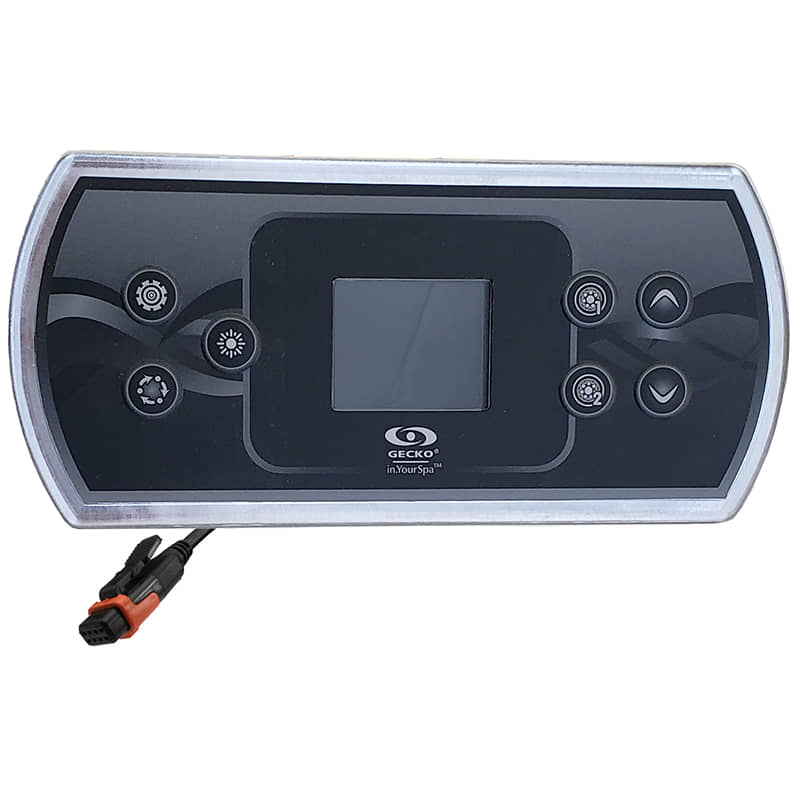
IN.K500 Gecko Topside Control
£254.80 Inc VAT
21 in stock
💧 Gecko IN.K500 Topside Panel – Advanced Seven-Button Main Control with Settings & Mode for IN.Y Series Spa Systems
Feature-packed seven-button main topside with dedicated Settings, Mode, and dual-pump control for Gecko IN.Y series spa systems
📋 Product Overview
The Gecko IN.K500 Topside Panel (TS-AE500) is an advanced main topside control panel featuring seven buttons for comprehensive spa control. Designed specifically for Gecko IN.Y series spa systems, the IN.K500 offers dedicated Settings and Mode buttons alongside dual-pump control, lighting, and temperature adjustment – providing the most complete button-based control interface in the Gecko range.
Measuring 182 mm × 85 mm with a 3 metre cable, the IN.K500 features an LED screen for temperature display and status information. The seven-button layout includes Settings, Light, Mode, Pump 1, Pump 2, Up, and Down – giving users direct access to system configuration, operating modes, and all essential spa functions without navigating complex menus.
Operating at 12V and connecting via Gecko’s proprietary IN.LINK system, the IN.K500 delivers safe, reliable control. A quick reference card and comprehensive technical manual are available for download. Important: This topside panel must be installed on the outside edge of the hot tub.
⭐ Key Features
- ✅ Seven-Button Interface – Settings, Light, Mode, Pump 1, Pump 2, Up, Down
- ✅ Dedicated Settings Button – Direct access to system configuration
- ✅ Mode Selection – Quick access to operating modes
- ✅ Dual-Pump Control – Operate 2 pump zones independently
- ✅ LED Screen Display – Temperature and status information
- ✅ Temperature Control – Up/Down buttons for precise adjustment
- ✅ 3 Metre Cable – Generous cable length for flexible installation
- ✅ IN.Y Series Compatible – Designed for IN.Y systems
- ✅ IN.LINK Connection – Gecko’s proprietary plug-and-play system
- ✅ 12V Operation – Safe low voltage design
⚙️ Technical Specifications
| Specification | Value |
|---|---|
| Manufacturer | Gecko Alliance |
| Model | IN.K500 |
| SKU | TS-AE500 |
| Product Type | Topside Panel (Main) |
| Number of Buttons | 7 |
| Button Functions | Settings, Light, Mode, Pump 1, Pump 2, Up, Down |
| Maximum Pumps Controlled | 2 |
| Blower / Aux | 0 |
| Display Type | LED Screen |
| Panel Length | 182 mm |
| Panel Height | 85 mm |
| Cable Length | 3 m |
| Operating Voltage | 12V |
| Connection Type | IN.LINK |
| Compatible Systems | IN.Y Systems |
| Installation Position | Outside edge of hot tub only |
| Box Quantity | 12 |
🔌 Compatibility Guide
This Topside Panel is Compatible With:
| Spa Pack Model | Type | Confirmed |
|---|---|---|
| IN.Y | Gecko Spa Pack | ✅ |
| IN.Y Series | Gecko Spa Pack | ✅ |
NOT Compatible With:
- ❌ Gecko IN.XM or IN.XE (use IN.K450)
- ❌ Gecko in.xe (use IN.K200)
- ❌ Gecko Y Series or X Series (use IN.K1000)
- ❌ Gecko IN.Clear (use IN.K200 In.Clear variant)
- ❌ Balboa systems (BP, GS, GL Series)
- ❌ Other manufacturer spa packs
Connection Requirements:
- Spa pack must be IN.Y series
- Spa pack must have IN.LINK topside port available
- 12V power supply from spa pack
- Installation position on outside edge of hot tub
📍 How to Verify Compatibility:
- Confirm your spa pack is IN.Y series
- Locate the IN.LINK topside port on your Gecko spa pack
- Check existing topside model if replacing
- Ensure installation location is on outside edge
⚠️ Important: The IN.K500 uses Gecko’s proprietary IN.LINK connection. This panel will NOT work with Balboa or other manufacturer systems.
⚠️ Critical Installation Requirement
This touchpad MUST be installed on the OUTSIDE edge of the hot tub.
| Requirement | Detail |
|---|---|
| Installation Position | Outside edge only |
| Not Suitable For | Internal or recessed mounting |
| Reason | Panel design and sealing requirements |
This is a manufacturer requirement – installing the IN.K500 in any other position may affect operation or void warranty. Ensure your spa has a suitable outside edge mounting location before purchasing.
🔘 Button Functions & LED Display
Seven-Button Operation:
| Button | Function | Action |
|---|---|---|
| SETTINGS | System Configuration | Access spa settings and configuration |
| LIGHT | Lighting Control | Activate/cycle spa lighting |
| MODE | Operating Mode | Select operating mode (economy, standard, etc.) |
| PUMP 1 | Pump 1 Control | Activate/cycle Pump 1 speeds |
| PUMP 2 | Pump 2 Control | Activate/cycle Pump 2 speeds |
| UP (▲) | Temperature Up | Increase set temperature |
| DOWN (▼) | Temperature Down | Decrease set temperature |
LED Display Features:
| Display Element | Shows |
|---|---|
| Temperature | Current water temperature |
| Set Point | Desired temperature when adjusting |
| Mode Indicator | Current operating mode |
| Status Icons | Heating, filtering, pump indicators |
| Error Codes | System diagnostic messages |
| Settings Menu | Configuration options when in settings |
Operating Notes:
- Press Settings to access system configuration menu
- Press Mode to cycle through available operating modes
- Press Pump 1 or Pump 2 to activate respective jets
- Press again to cycle pump speeds or turn off
- Press Light to activate lighting or cycle colours/modes
- Press Up/Down to adjust desired water temperature
- Both pumps can operate simultaneously
🔄 Gecko Main Topside Comparison
How IN.K500 Compares:
| Feature | IN.K200 | IN.K300 | IN.K450 | IN.K500 | IN.K1000 |
|---|---|---|---|---|---|
| Buttons | 4 | 4 | 6 | 7 | Touch |
| Max Pumps | 1-2 | 1 | 3 | 2 | Full |
| Settings Button | ❌ | ❌ | ❌ | ✅ | ✅ |
| Mode Button | ❌ | ❌ | ❌ | ✅ | ✅ |
| Cable Length | – | – | – | 3m | 3m |
| Compatible | Various | IN.YE | IN.XM/XE/YE | IN.Y | Y/X Series |
Choose IN.K500 When:
- Your spa has IN.Y series system
- You want dedicated Settings and Mode buttons
- You need dual-pump control
- You want comprehensive control without touchscreen
- You have an outside edge mounting location
💡 Settings & Mode Button Advantages
Why Dedicated Settings & Mode Buttons?
| Feature | Benefit |
|---|---|
| Settings Button | Direct access to configuration without complex navigation |
| Mode Button | Quick switching between economy, standard, and other modes |
| No Menu Diving | Essential functions always one button press away |
| User-Friendly | Intuitive operation for all family members |
| Quick Adjustments | Change modes instantly when entering spa |
Common Mode Options (System Dependent):
- Economy Mode: Lower temperature when spa not in use
- Standard Mode: Normal operating temperature
- Sleep Mode: Extended energy saving
- Ready Mode: Maintain set temperature
Refer to your spa pack documentation for available modes.
🎛️ Purpose & Application
What is the IN.K500?
The IN.K500 is an advanced main topside control panel providing:
- System settings access
- Operating mode selection
- Temperature monitoring and adjustment
- Dual-pump zone control
- Lighting control
- System status display
- Error code visibility
Main Topside vs Simpler Panels:
| Feature | IN.K500 (7-Button) | IN.K300 (4-Button) |
|---|---|---|
| Settings Access | ✅ Dedicated button | Via button combo |
| Mode Selection | ✅ Dedicated button | Limited/none |
| Pump Control | 2 pumps | 1 pump |
| Configuration | Direct | Basic |
| User Level | All users | Basic operation |
🛠️ Installation Guide
Before Installation:
- ⚠️ Disconnect power to spa at the isolator/breaker before any work
- ⚠️ Verify your spa pack is IN.Y series
- ⚠️ Confirm outside edge mounting location is available
- ⚠️ Check 3m cable length is sufficient for your installation
- ⚠️ Review the technical manual before starting
Installation Steps:
- Turn off power at the isolator/breaker
- Identify outside edge mounting location (MANDATORY)
- Prepare cutout for 182 mm × 85 mm panel
- Remove existing topside panel if replacing
- Route 3m cable from installation point to spa pack
- Connect the IN.LINK connector to the spa pack’s topside port
- Mount the IN.K500 panel on outside edge
- Ensure watertight seal around panel
- Restore power and test all seven buttons
Mounting Information:
| Specification | Detail |
|---|---|
| Panel Size | 182 mm × 85 mm |
| Cable Length | 3 m |
| Connection | IN.LINK |
| Position | Outside edge ONLY |
| Technical Manual | Available for download |
| Quick Reference | Available for download |
⚠️ Professional installation recommended for proper mounting, watertight sealing, and electrical safety.
🔗 Wiring & Connection
Connector Information:
| Specification | Detail |
|---|---|
| Connector Type | IN.LINK |
| Cable Length | 3 m |
| Operating Voltage | 12V |
Connection Location:
The IN.K500 connects to the IN.LINK topside port on Gecko IN.Y series spa packs. As a main topside panel, it connects to the primary topside port.
⚠️ Never force the connector. The IN.LINK plug should connect smoothly. If it doesn’t fit, verify you’re connecting to the correct port on a compatible IN.Y system.
🔍 Troubleshooting
Common Issues:
| Problem | Possible Cause | Solution |
|---|---|---|
| LED screen blank | No power or loose connection | Check power and reseat IN.LINK connector |
| Settings not accessible | System locked | Check spa pack settings |
| Mode not changing | Mode locked or unavailable | Refer to technical manual |
| Pump 1/2 not responding | Pump fault or configuration | Check pump and spa pack settings |
| Incorrect temperature | Sensor issue | Check temperature sensor connection |
| Light not working | Bulb/LED faulty | Check light unit |
| Error codes displayed | Various system issues | Refer to technical manual for meanings |
Error Code Display:
The IN.K500 LED screen displays error codes from the spa pack. Refer to the downloadable technical manual (ink500_techbook_en.pdf) or quick reference card for specific error code meanings and solutions.
🔩 Maintenance & Care
Routine Care:
| Task | Frequency |
|---|---|
| Wipe with soft damp cloth | Weekly |
| Check all seven button responses | Monthly |
| Check LED display clarity | Monthly |
| Inspect watertight seal | Annually |
| Check cable condition | Annually |
DO NOT:
- ❌ Use abrasive cleaners
- ❌ Use solvent-based cleaners
- ❌ Submerge the panel
- ❌ Press buttons with sharp objects
- ❌ Force button operation
- ❌ Install anywhere other than outside edge
♨️ Ideal Applications
| Application | Suitability |
|---|---|
| ♨️ Gecko IN.Y series spa systems | ✅ Ideal |
| ♨️ Dual-pump hot tubs | ✅ Ideal |
| ♨️ Users wanting Settings/Mode access | ✅ Ideal |
| ♨️ Outside edge mounting locations | ✅ Required |
| 🔄 Replacement for faulty IN.K500 | ✅ Direct replacement |
| ❌ Recessed or internal mounting | ❌ Not suitable |
| ❌ Three-pump spas | ❌ Use IN.K450 |
| ❌ Balboa systems | ❌ Use Balboa topside |
Common Installation Scenarios:
- 🛁 New Gecko IN.Y series spa builds
- 💆 Replacing damaged or faulty IN.K500
- ♨️ Dual-pump spa configurations
- 🔄 Upgrading from simpler panel (with compatible system)
❓ Frequently Asked Questions
Q: Why must this be installed on the outside edge?
A: The IN.K500 is designed specifically for outside edge mounting. This is a manufacturer requirement related to the panel’s design, sealing, and operational characteristics. Installing elsewhere may affect performance or void warranty.
Q: What is the difference between IN.K500 and IN.K450?
A: The IN.K500 has 7 buttons with dedicated Settings and Mode buttons, controls 2 pumps, and is for IN.Y systems. The IN.K450 has 6 buttons with Power button, controls 3 pumps, and is for IN.XM/XE/YE systems. They are for different systems and not interchangeable.
Q: What does the Settings button do?
A: The Settings button provides direct access to system configuration options such as temperature limits, filter cycles, and other spa pack settings without navigating through complex button combinations.
Q: What does the Mode button do?
A: The Mode button allows quick selection of operating modes such as economy, standard, or sleep modes. Available modes depend on your spa pack configuration.
Q: Is the 3m cable long enough?
A: The 3m cable should suit most installations. Measure from your outside edge mounting location to the spa pack before ordering. Extension cables may be available if needed.
Q: Is my spa compatible?
A: The IN.K500 is compatible with Gecko IN.Y series spa packs. Check your spa pack label to confirm.
Q: What size is the panel?
A: The IN.K500 measures 182 mm × 85 mm.
Q: Is documentation available?
A: Yes, a quick reference card and full technical manual are available for download.
Q: Will this work with my Balboa spa?
A: No. The IN.K500 is a Gecko product and only works with Gecko IN.Y systems. For Balboa spas, you need a Balboa topside panel.
📄 Downloads & Resources
🏆 Why Choose the Gecko IN.K500 (TS-AE500)
- ✅ Seven-Button Control – Most comprehensive button interface
- ✅ Dedicated Settings Button – Direct configuration access
- ✅ Mode Button – Quick operating mode selection
- ✅ Dual-Pump Capability – Operate 2 pump zones independently
- ✅ LED Screen Display – Temperature and comprehensive status
- ✅ 3 Metre Cable – Flexible installation options
- ✅ IN.Y Series Compatible – Designed for IN.Y systems
- ✅ IN.LINK Connection – Proprietary plug-and-play
- ✅ Full Documentation – Manual and quick reference available
- ✅ Genuine Gecko Quality – Manufactured to Gecko Alliance standards
🇬🇧 Why Buy from Parts4Tubs
- ✅ UK-based company with local support
- ✅ Fast UK delivery
- ✅ Expert advice from spa specialists
- ✅ Both Gecko and Balboa products available
- ✅ Compatibility assistance for all spa brands
- ✅ Full warranty support
- ✅ Easy returns within 30 days
✨ Summary
The Gecko IN.K500 Topside Panel (TS-AE500) is an advanced seven-button main topside control panel designed for Gecko IN.Y series spa systems. This feature-rich panel offers dedicated Settings and Mode buttons alongside Pump 1, Pump 2, Light, and Up/Down temperature controls with LED screen display. Measures 182 mm × 85 mm with 3 metre cable and connects via Gecko’s proprietary IN.LINK system at 12V. Important: Must be installed on the outside edge of the hot tub. Compatible with IN.Y systems ONLY – NOT for Balboa or other systems. Quick reference card and technical manual available for download. Order from Parts4Tubs for fast UK delivery and expert compatibility advice.
| Part# | 0607-008033 |
|---|
Related products
Control Boxes, Spa Packs & Topside Controls
Control Boxes, Spa Packs & Topside Controls
Control Boxes, Spa Packs & Topside Controls
Control Boxes, Spa Packs & Topside Controls
Chemicals & Accessories
Control Boxes, Spa Packs & Topside Controls
Control Boxes, Spa Packs & Topside Controls