IN.K300 1 pump Gecko Topside Control
£117.14 Inc VAT
19 in stock
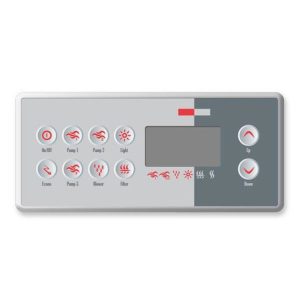
♨️ Gecko IN.K300 Topside Panel (1 Pump) – Main Control Panel with LED Display for IN.YE Series Spa Systems
Full-featured main topside with temperature control, pump and lighting for Gecko IN.YE series spa systems
📋 Product Overview
The Gecko IN.K300 Topside Panel (TS-AE300) is a main topside control panel designed specifically for Gecko IN.YE series spa systems. This single-pump variant provides complete spa control including temperature adjustment, jet pump operation, and lighting from a well-proportioned panel measuring 159 mm × 75 mm.
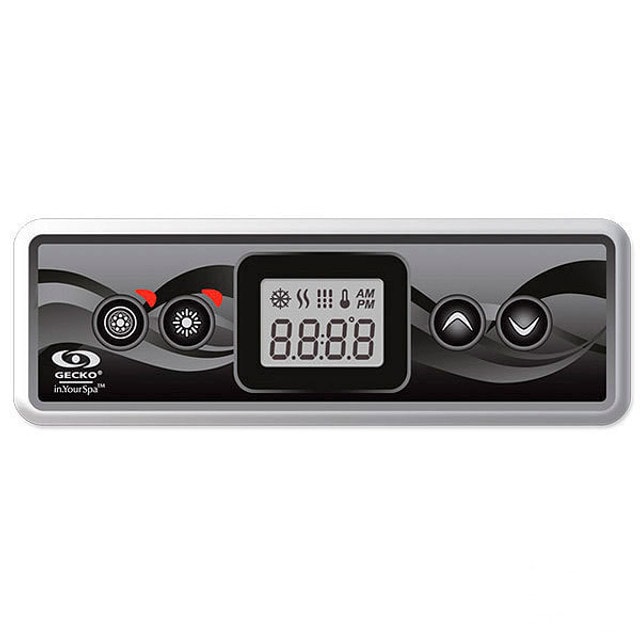
The IN.K300 sits between the compact IN.K200 range and larger panels in the Gecko lineup, offering an ideal balance of functionality and size. Featuring an LED screen for temperature display and status information along with four dedicated buttons for Pump 1, Light, and Up/Down temperature control, this panel delivers everything needed for comfortable spa operation.
Operating at 12V and connecting via Gecko’s proprietary IN.LINK system, the IN.K300 provides safe, reliable control of your IN.YE series spa. The overlay is included, and a comprehensive technical manual is available for download, making installation and operation straightforward.
⭐ Key Features
- ✅ IN.YE Series Compatible – Designed for IN.YE spa systems
- ✅ LED Screen Display – Temperature and status information
- ✅ Temperature Control – Up/Down buttons for precise adjustment
- ✅ Single Pump Control – Pump 1 operation
- ✅ Light Control – Spa lighting operation
- ✅ Balanced Dimensions – 159 mm × 75 mm
- ✅ IN.LINK Connection – Gecko’s proprietary plug-and-play system
- ✅ 12V Operation – Safe low voltage design
- ✅ Overlay Included – Ready to install immediately
- ✅ Technical Manual Available – Comprehensive documentation
⚙️ Technical Specifications
| Specification | Value |
|---|---|
| Manufacturer | Gecko Alliance |
| Model | IN.K300 |
| Variant | 1 Pump |
| SKU | TS-AE300 |
| Product Type | Topside Panel (Main) |
| Number of Buttons | 4 |
| Button Functions | Pump 1, Light, Up, Down |
| Maximum Pumps Controlled | 1 |
| Blower / Aux | 0 |
| Display Type | LED Screen |
| Panel Length | 159 mm |
| Panel Height | 75 mm |
| Operating Voltage | 12V |
| Connection Type | IN.LINK |
| Compatible Systems | IN.YE Systems |
| Overlay Included | ✅ Yes |
🔌 Compatibility Guide
This Topside Panel is Compatible With:
| Spa Pack Model | Type | Confirmed |
|---|---|---|
| IN.YE | Gecko Spa Pack | ✅ |
NOT Compatible With:
- ❌ Gecko in.xe systems (use IN.K200 variants)
- ❌ Gecko Y Series or X Series (use IN.K1000)
- ❌ Gecko IN.XM or IN.XM2 (use IN.K120)
- ❌ Balboa systems (BP, GS, GL Series)
- ❌ Other manufacturer spa packs
Connection Requirements:
- Spa pack must be IN.YE series
- Spa pack must have IN.LINK topside port available
- 12V power supply from spa pack
📍 How to Verify Compatibility:
- Confirm your spa pack is Gecko IN.YE series
- Locate the IN.LINK topside port on your Gecko spa pack
- Check existing topside model if replacing
⚠️ Important: The IN.K300 uses Gecko’s proprietary IN.LINK connection and is designed specifically for IN.YE systems. This panel will NOT work with Balboa or other manufacturer systems.
🔘 Button Functions & LED Display
Four-Button Operation:
| Button | Function | Action |
|---|---|---|
| PUMP 1 | Jet Pump Control | Activate/cycle Pump 1 speeds |
| LIGHT | Lighting Control | Activate/cycle spa lighting |
| UP (▲) | Temperature Up | Increase set temperature |
| DOWN (▼) | Temperature Down | Decrease set temperature |
LED Display Features:
| Display Element | Shows |
|---|---|
| Temperature | Current water temperature |
| Set Point | Desired temperature when adjusting |
| Status Icons | Heating, filtering indicators |
| Error Codes | System diagnostic messages |
Operating Notes:
- Press Pump 1 to activate jets, press again to cycle speeds or turn off
- Press Light to activate lighting or cycle through colour modes
- Press Up/Down to adjust desired water temperature
- LED screen shows real-time water temperature and system status
- Error codes from spa pack are displayed on the LED screen
🔄 Gecko Main Topside Comparison
How IN.K300 Compares:
| Feature | IN.K200 (1P) | IN.K200 (2P) | IN.K300 (1P) | IN.K1000 |
|---|---|---|---|---|
| SKU | TS-AE202 | TS-AE200 | TS-AE300 | TS-GCK10 |
| Pumps | 1 | 2 | 1 | Full |
| Dimensions | 510 × 120 mm | 120 × 51 mm | 159 × 75 mm | 190 × 130 mm |
| Display | LED | LED | LED | Touchscreen |
| Compatible | in.xe/Y Series | Gecko IN | IN.YE | Y/X Series |
| Overlay | No | No | ✅ Yes | N/A |
Choose IN.K300 When:
- Your spa has a Gecko IN.YE series system
- You want a balanced panel size (not too large or compact)
- You need single pump control with temperature adjustment
- You prefer overlay included for immediate installation
💡 IN.K300 Design Advantages
Why the IN.K300 Form Factor?
| Feature | Benefit |
|---|---|
| 159 × 75 mm size | Balanced visibility without dominating spa surround |
| LED screen | Clear temperature display in all lighting conditions |
| 4-button layout | Simple, intuitive operation |
| Overlay included | Ready to install with no additional purchases |
| IN.YE specific | Optimised for IN.YE system features |
Ideal for:
- Mid-sized hot tubs with IN.YE systems
- Users wanting clear display without touchscreen complexity
- Installations requiring a professional, finished appearance
- Replacements where overlay availability is important
🎛️ Purpose & Application
What is the IN.K300?
The IN.K300 is a main topside control panel – your spa’s primary user interface. It provides:
- Temperature monitoring and adjustment
- Pump control for hydrotherapy jets
- Lighting control
- System status display
- Error code visibility
Main Topside vs Auxiliary Panel:
| Feature | Main Topside (IN.K300) | Auxiliary Panel |
|---|---|---|
| Purpose | Primary spa control | Secondary remote control |
| Temperature Control | ✅ Yes – Up/Down buttons | ❌ No |
| Temperature Display | ✅ Yes – LED screen | Limited or none |
| Error Display | ✅ Shows error codes | ❌ No |
| Installation | Required – main control | Optional – secondary location |
🛠️ Installation Guide
Before Installation:
- ⚠️ Disconnect power to spa at the isolator/breaker before any work
- ⚠️ Verify your spa pack is IN.YE series
- ⚠️ Plan cable routing to spa pack
- ⚠️ Prepare mounting location for 159 mm × 75 mm panel
- ⚠️ Review the technical manual before starting
Installation Steps:
- Turn off power at the isolator/breaker
- Prepare cutout according to technical manual specifications
- Remove existing topside panel if replacing
- Route cable from installation point to spa pack
- Connect the IN.LINK connector to the spa pack’s topside port
- Mount the IN.K300 panel in the prepared cutout
- Apply included overlay
- Ensure watertight seal around panel
- Restore power and test all functions
Mounting Information:
| Specification | Detail |
|---|---|
| Panel Size | 159 mm × 75 mm |
| Connection | IN.LINK |
| Overlay | Included |
| Technical Manual | Available for download |
⚠️ Professional installation recommended for proper mounting, watertight sealing, and electrical safety.
🔗 Wiring & Connection
Connector Information:
| Specification | Detail |
|---|---|
| Connector Type | IN.LINK |
| Operating Voltage | 12V |
Connection Location:
The IN.K300 connects to the IN.LINK topside port on Gecko IN.YE series spa packs. As a main topside panel, it connects to the primary topside port, not an auxiliary port.
⚠️ Never force the connector. The IN.LINK plug should connect smoothly. If it doesn’t fit, verify you’re connecting to the correct port on a compatible IN.YE system.
🔍 Troubleshooting
Common Issues:
| Problem | Possible Cause | Solution |
|---|---|---|
| LED screen blank | No power or loose connection | Check power and reseat IN.LINK connector |
| Incorrect temperature | Sensor issue | Check temperature sensor connection |
| Pump not responding | Pump fault or configuration | Check pump and spa pack settings |
| Light not working | Bulb/LED faulty | Check light unit |
| Error codes displayed | Various system issues | Refer to spa pack manual for meanings |
| Buttons unresponsive | Connection or overlay issue | Check connection and overlay alignment |
Error Code Display:
The IN.K300 LED screen displays error codes from the spa pack. Common codes include temperature sensor errors, flow issues, and heater faults. Refer to your Gecko spa pack documentation or the IN.K300 technical manual for specific error code meanings and solutions.
🔩 Maintenance & Care
Routine Care:
| Task | Frequency |
|---|---|
| Wipe with soft damp cloth | Weekly |
| Check all button responses | Monthly |
| Check LED display clarity | Monthly |
| Inspect watertight seal | Annually |
| Check overlay condition | Annually |
DO NOT:
- ❌ Use abrasive cleaners
- ❌ Use solvent-based cleaners
- ❌ Submerge the panel
- ❌ Press buttons with sharp objects
- ❌ Force button operation
Overlay Care:
The included overlay provides button labels and protection. If it becomes worn or damaged, replacement overlays may be available.
♨️ Ideal Applications
| Application | Suitability |
|---|---|
| ♨️ Gecko IN.YE series spa systems | ✅ Ideal |
| ♨️ Single-pump hot tubs | ✅ Ideal |
| ♨️ Mid-sized spas | ✅ Ideal |
| 🔄 Replacement for faulty IN.K300 | ✅ Direct replacement |
| ❌ Multi-pump spas | ❌ Use multi-pump variant |
| ❌ in.xe systems | ❌ Use IN.K200 |
| ❌ Balboa systems | ❌ Use Balboa topside |
Common Installation Scenarios:
- 🛁 New Gecko IN.YE series spa builds
- 💆 Replacing damaged or faulty main topside
- ♨️ Single-pump spa configurations
- 🔄 Upgrading older IN.YE topside panels
❓ Frequently Asked Questions
Q: What is the difference between IN.K300 and IN.K200?
A: The IN.K300 is designed for IN.YE systems and measures 159 × 75 mm with overlay included. The IN.K200 comes in multiple variants for different systems (in.xe, Y Series, Gecko IN, IN.Clear) with different dimensions. They are not interchangeable.
Q: Is this a main topside or auxiliary panel?
A: The IN.K300 is a main topside panel. It provides full spa control including temperature display and adjustment.
Q: Is the overlay included?
A: Yes, the overlay is included with the IN.K300 (TS-AE300), making it ready to install immediately.
Q: Is my spa compatible?
A: The IN.K300 (1 Pump) is compatible with Gecko IN.YE series spa packs. Check your spa pack label to confirm your system type.
Q: What size is the panel?
A: The IN.K300 measures 159 mm × 75 mm – a balanced size offering good visibility without being overly large.
Q: Is documentation available?
A: Yes, a comprehensive technical manual (ink300_techbook_en.pdf) is available for download.
Q: Does this show water temperature?
A: Yes, the LED screen displays the current water temperature and allows you to adjust the set point using the Up/Down buttons.
Q: Will this work with my Balboa spa?
A: No. The IN.K300 is a Gecko product and only works with Gecko IN.YE series systems. For Balboa spas, you need a Balboa topside panel.
Q: Can I add an auxiliary panel alongside this?
A: Yes, you can add compatible auxiliary panels for secondary control points while using the IN.K300 as your main topside.
📄 Downloads & Resources
🏆 Why Choose the Gecko IN.K300 (TS-AE300)
- ✅ IN.YE Series Compatible – Designed for IN.YE systems
- ✅ LED Screen Display – Temperature and status information
- ✅ Temperature Control – Up/Down adjustment buttons
- ✅ Balanced Size – 159 mm × 75 mm
- ✅ IN.LINK Connection – Proprietary plug-and-play
- ✅ Overlay Included – Ready to install
- ✅ Technical Manual – Comprehensive documentation
- ✅ Genuine Gecko Quality – Manufactured to Gecko Alliance standards
🇬🇧 Why Buy from Parts4Tubs
- ✅ UK-based company with local support
- ✅ Fast UK delivery
- ✅ Expert advice from spa specialists
- ✅ Both Gecko and Balboa products available
- ✅ Compatibility assistance
- ✅ Full warranty support
- ✅ Easy returns within 30 days
✨ Summary
The Gecko IN.K300 Topside Panel (TS-AE300) is a main topside control panel designed specifically for Gecko IN.YE series spa systems. This single-pump variant features a balanced 159 mm × 75 mm design with an LED screen display and four buttons controlling Pump 1, Light, and temperature adjustment (Up/Down). Connects via Gecko’s proprietary IN.LINK system at 12V. Compatible with IN.YE systems ONLY – NOT for Balboa or other systems. Overlay included and technical manual available for download. Order from Parts4Tubs for fast UK delivery and expert compatibility advice.
| Part# | 0607-008036 |
|---|
Related products
Control Boxes, Spa Packs & Topside Controls
Gecko IN.YE-5 Control Box 3kW (V2) – Enhanced Spa Control System
Heating
Heating
Heating
Control Boxes, Spa Packs & Topside Controls
Control Boxes, Spa Packs & Topside Controls
Gecko IN.YJ-3-V3 Control Box Only – Compact Spa Controller for Small Footprint Spas
Control Boxes, Spa Packs & Topside Controls