

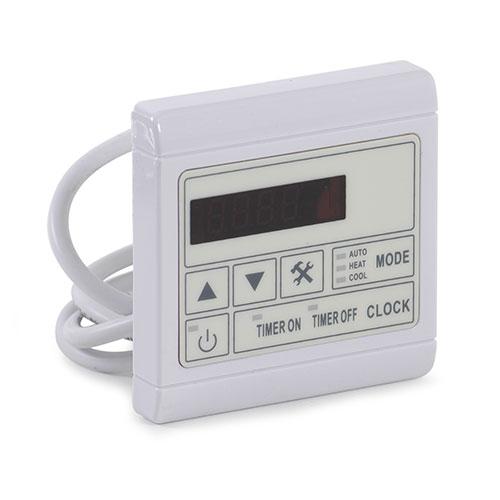
Duratech DURA/DURA+ Display Panel 2014 Onwards
£520.97 Inc VAT
3 in stock
Display Panel for Duratech DURA / DURA+ Heat Pumps
Genuine OEM Control Display Panel for 2014+ Models
As a retailer of pool and spa heating equipment, I supply genuine OEM display panels specifically designed for Duratech DURA and DURA+ heat pump systems. This factory-specified component provides the user interface for controlling and monitoring your heat pump operation from 2014 onwards.
Product Overview
This display panel serves as the primary user interface for your Duratech heat pump, providing temperature readouts, operational status indicators, and control inputs for system settings. The panel communicates with the main control board to display real-time information and allows you to adjust temperature setpoints, operating modes, and system parameters.
Key Features
OEM Specification
Manufactured to Duratech’s exact specifications for all DURA and DURA+ models from 2014 onwards, ensuring proper electrical compatibility and communication protocols.
Complete User Interface
Features digital display, control buttons, and status indicators for comprehensive heat pump monitoring and adjustment.
Universal DURA Compatibility
Compatible across the entire DURA and DURA+ model range, providing standardized control interface across different capacity units.
Applications
This display panel is essential for heat pump control and monitoring in all compatible Duratech models. Common replacement indicators include blank or flickering display, unresponsive buttons, incorrect temperature readings, missing display segments, or communication errors with the main control board.
Technical Specifications
| Specification | Details |
|---|---|
| Compatible Models | All Duratech DURA and DURA+ models |
| Model Year | 2014 onwards |
| Component Type | Display Control Panel |
| Application | User interface and system monitoring |
| Weight | 0.12 kg |
| Dimensions | 150mm (L) x 110mm (W) x 30mm (H) |
| SKU | 6770396342 |
| Manufacturer | Duratech |
Installation Notes
Display panel replacement requires careful handling and proper electrical connections. Always disconnect power before servicing, ensure secure connection of the communication cable to the main control board, verify correct mounting orientation, and test all display functions and button responses after installation.
| Weight | 0.12 Kilograms |
|---|---|
| Length | 0.15 Meters |
| Width | 0.11 Meters |
| Height | 0.03 Meters |
| Volume | 0.000495 CubicMeters |
| Supplier | GoldenC |
Related products
Spares
Spares
Spares
Spares