
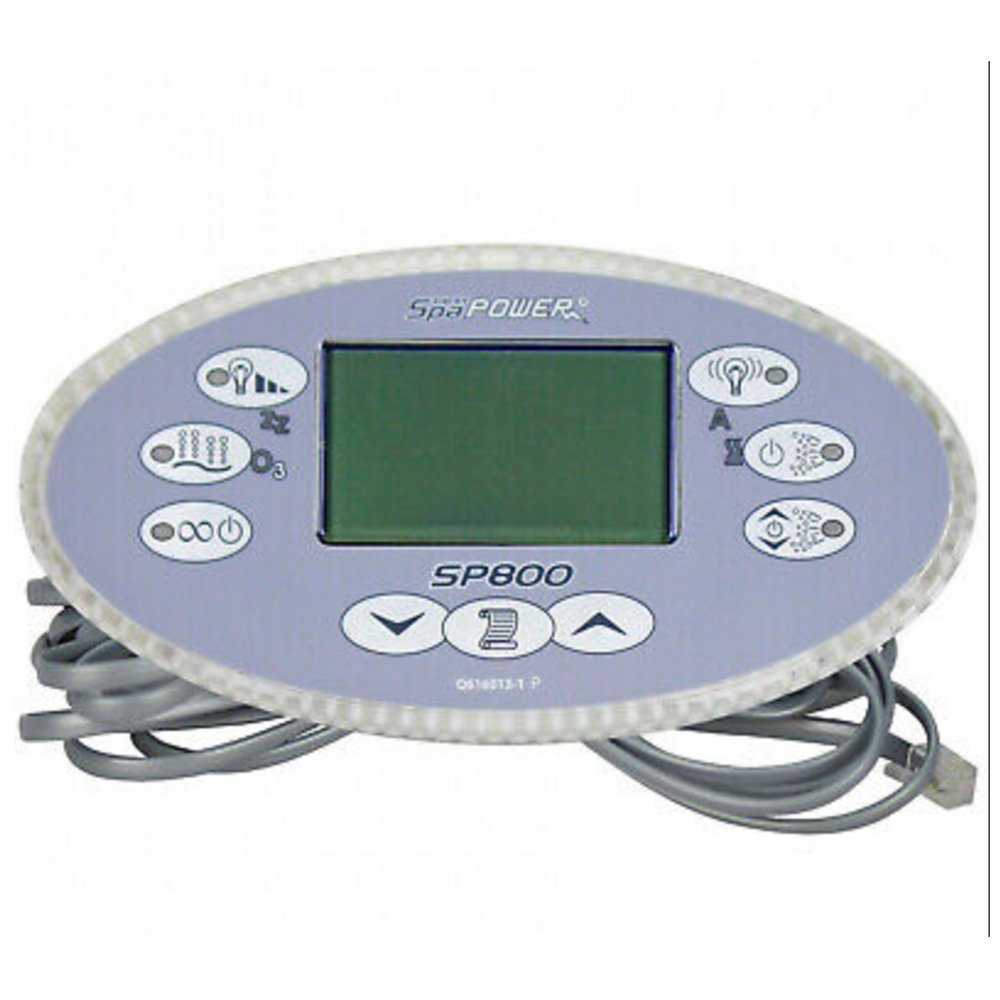
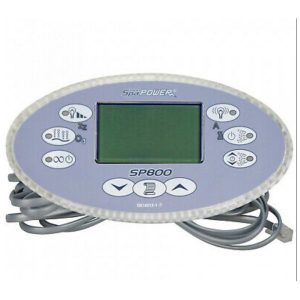
(Davey) SP800 Touch Panel With Overlay
£372.08 Inc VAT
4 in stock
💡 Davey SP800 Touch Panel – Advanced 9-Button Topside with Digital Display
Feature-rich Australian-designed topside control with digital screen, variable blower speed, and dual pump support
📋 Product Overview
The Davey SP800 Touch Panel (TS-SP800) is an advanced 9-button topside control designed for Spa Power SP800 control systems. This Australian-engineered panel delivers comprehensive spa control with enhanced features including variable blower speed, light level control, and support for dual pump configurations – making it ideal for mid to high-end spa installations requiring more sophisticated control options.
Manufactured by Spa Power (Davey), this topside features a digital screen display for clear temperature and status readouts, stepping up from the basic LCD found on entry-level models. The 9-button layout provides dedicated controls for dual pumps (Pump 1a and Pump 1b), variable blower speed, adjustable light levels, auxiliary outputs, and intuitive temperature management.
Compatible with the SP800 Control Box, this panel connects via standard telephone cord style cable for reliable communication. Operating at 12V, it provides safe, low-voltage control for dual-pump spa installations. The SP800 represents Spa Power’s mid-range offering, bridging the gap between entry-level SP601 systems and the high-capacity SP1200.
⭐ Key Features
- ✅ 9 Button Controls – Comprehensive function access
- ✅ Digital Screen – Enhanced display clarity
- ✅ 2 Pump Support – Dual pump control (Pump 1a & 1b)
- ✅ Variable Blower Speed – Adjustable air intensity
- ✅ Light Level Control – Adjustable lighting brightness
- ✅ 1 Blower/Auxiliary – Dedicated blower control
- ✅ Auxiliary Output – Additional accessory control
- ✅ Scroll Function – Easy menu navigation
- ✅ 12V Operation – Safe low-voltage design
- ✅ Telephone Cord Connection – Standard reliable interface
🔧 Technical Specifications
| Specification | Value |
|---|---|
| Manufacturer | Spa Power (Davey) |
| Model | SP800 Touch Panel |
| SKU | TS-SP800 |
| Product Type | Topside Panel |
| Total Buttons | 9 |
| Display Type | Digital Screen |
| Max Pumps | 2 |
| Blower/Auxiliary | 1 |
| Operating Voltage | 12V |
| Connection Type | Telephone cord style |
| Compatible System | SP800 Control Box |
📟 Display Features
The digital screen provides enhanced spa information:
| Feature | Description |
|---|---|
| Display Type | Digital Screen |
| Temperature Display | Current and set water temperature |
| Status Indication | System operating status |
| Visual Clarity | Enhanced digital readout |
| Menu Navigation | Scroll button for settings |
🔘 Button Functions & Controls
The comprehensive 9-button layout provides full spa control:
| Button | Function |
|---|---|
| Temp Up | Increase set temperature |
| Temp Down | Decrease set temperature |
| Pump 1a | Activate primary pump / low speed |
| Pump 1b | Activate secondary pump / high speed |
| Variable Blower Speed | Adjust air blower intensity |
| Light Level | Adjust lighting brightness |
| Light Affective | Lighting mode/effects control |
| Aux | Auxiliary output control |
| Scroll | Navigate menus and settings |
Advanced Button Features:
- Variable Blower Speed – Not just on/off, but adjustable intensity
- Light Level – Dim or brighten spa lighting
- Dual Pump Control – Independent control of Pump 1a and 1b
- Scroll Navigation – Access advanced settings and modes
🌟 Advanced Features
Variable Blower Speed Control
Unlike basic topsides with simple on/off blower control, the SP800 offers:
- Adjustable air intensity levels
- Customise massage strength
- Quieter operation at lower speeds
- Energy saving options
Light Level Control
Enhanced lighting features include:
- Adjustable brightness levels
- Light Affective mode for effects
- Mood lighting customisation
- Energy-efficient dimming
Dual Pump Configuration
The SP800 supports sophisticated pump arrangements:
- Pump 1a – Primary pump / low speed operation
- Pump 1b – Secondary pump / high speed operation
- Independent pump control
- Multi-zone jet management
🔗 Compatibility Guide
✅ Compatible Control Systems
| System | Model | Compatible |
|---|---|---|
| Spa Power | SP800 Control Box | ✅ Yes |
❌ NOT Compatible With
| System | Reason |
|---|---|
| SP400/500/600/601 | Different system class |
| SP1200 | Different system entirely |
⚠️ Important: This topside is designed exclusively for the SP800 Control Box.
How to Verify Compatibility:
- 📍 Check your control box for “SP800” marking
- 📍 Look for Davey or Spa Power manufacturer branding
- 📍 Verify 2-pump system configuration
- 📍 Check for telephone cord style connection
- 📍 Contact Parts4Tubs if unsure
🔌 Connection Information
| Specification | Detail |
|---|---|
| Connection Type | Telephone cord style |
| Cable Style | Standard phone cable connector |
| Connection Port | SP800 Control Box |
Connection Notes:
- Uses familiar telephone-style connector
- Plug-and-play installation
- Secure, reliable connection
- Easy to disconnect for service
🛠️ Installation Guide
Before Installation:
- ⚠️ Disconnect power to spa at the isolator/breaker
- ⚠️ Verify SP800 Control Box compatibility
- ⚠️ Note dual pump configuration
- ⚠️ Ensure telephone cord connection is accessible
Installation Steps:
- Power Off – Isolate all electrical supply to spa
- Access Control Box – Locate SP800 unit
- Remove Old Panel – Carefully remove existing topside
- Disconnect Cable – Unplug telephone cord from control box
- Connect New Panel – Plug new topside cable into control box
- Mount Panel – Secure in mounting position
- Power On – Restore power and test functions
- Test All Buttons – Verify all 9 buttons respond correctly
- Check Display – Confirm digital screen shows correctly
- Test Pumps – Verify both Pump 1a and 1b function
- Test Variable Blower – Check blower speed adjustment
- Test Light Level – Verify lighting brightness control
Testing Checklist:
- [ ] Digital display shows temperature
- [ ] Temp Up/Down adjust temperature
- [ ] Pump 1a activates correctly
- [ ] Pump 1b activates correctly
- [ ] Variable blower speed adjusts
- [ ] Light level control works
- [ ] Light Affective mode functions
- [ ] Aux output responds
- [ ] Scroll navigates menus
🔍 Troubleshooting
Common Issues:
| Problem | Possible Cause | Solution |
|---|---|---|
| Blank display | No power / loose connection | Check power, reseat telephone cable |
| Buttons unresponsive | Connection issue / panel fault | Check cable connection |
| Pump 1a not working | Pump issue / control box | Check pump wiring at control box |
| Pump 1b not working | Pump issue / control box | Check pump wiring at control box |
| Blower speed not varying | Blower compatibility | Verify variable speed blower installed |
| Light not dimming | Light compatibility | Verify dimmable lights installed |
| Wrong temperature | Sensor issue (not topside) | Check temperature sensor |
Connection Tips:
- Ensure telephone cord clicks into place
- Check for bent or damaged connector pins
- Verify cable is not kinked or damaged
🛡️ Maintenance & Care
Routine Care:
| Task | Frequency |
|---|---|
| Wipe panel with soft, damp cloth | Weekly |
| Check button response | Monthly |
| Test all pump outputs | Monthly |
| Inspect cable connection | Annually |
DO NOT:
- ❌ Use abrasive cleaners
- ❌ Use harsh chemicals on panel
- ❌ Submerge panel in water
- ❌ Press buttons with sharp objects
♨️ Ideal Applications
| Application | Suitability |
|---|---|
| ♨️ SP800 system spas | ✅ Designed for |
| ♨️ Dual-pump spa installations | ✅ 2 pump support |
| ♨️ Spas with variable speed blowers | ✅ Variable control |
| ♨️ Spas with dimmable lighting | ✅ Light level control |
| ♨️ Mid-range spa systems | ✅ Feature-rich |
| ♨️ Replacement for faulty SP800 panel | ✅ Direct replacement |
| ❌ Entry-level single-pump spas | ❌ Use SP601 series |
| ❌ 3-pump configurations | ❌ Use SP1200 |
| ❌ Non-SP800 control systems | ❌ Not compatible |
Common Installation Scenarios:
- 🔧 Replacement for damaged SP800 topside
- 🔧 Mid-range spa repair
- 🔧 Dual-pump system maintenance
- 🔧 Spa refurbishment with variable speed equipment
❓ Frequently Asked Questions
Q: What makes the SP800 different from the SP601 panels?
A: The SP800 is a significant step up with 9 buttons (vs 4), dual pump support (vs single), digital screen (vs basic LCD), variable blower speed control, and light level adjustment. It’s designed for more sophisticated spa installations.
Q: What is variable blower speed?
A: Unlike basic on/off blower control, variable speed allows you to adjust the air intensity – from gentle bubbles to vigorous air massage. This requires a compatible variable speed blower to be installed.
Q: How does light level control work?
A: The SP800 allows you to dim or brighten your spa lighting rather than simple on/off. The Light Affective button may control colour modes or effects, depending on your lighting setup.
Q: What are Pump 1a and Pump 1b?
A: These typically represent low speed (1a) and high speed (1b) operation of a dual-speed pump, or control of two separate pump zones. The exact configuration depends on your SP800 system setup.
Q: Can I use this with my SP601 system?
A: No, this panel is only compatible with the SP800 Control Box. For SP600/601 systems, use the SP601 Touch Panel or SP601 Rectangular.
Q: What type of display does it have?
A: The SP800 features a digital screen display – an upgrade from the basic 3-digit LCD on entry-level models.
Q: What connection type does it use?
A: Telephone cord style connection, the same as the SP1200 and SP601 Rectangular.
Q: Is this suitable for a high-end spa?
A: The SP800 is a mid-range option with advanced features. For maximum pump capacity (3 pumps), consider the SP1200. For the features offered (variable blower, light control), the SP800 is excellent.
Q: What does the Aux button control?
A: The Aux (auxiliary) button controls an additional output on the SP800 system – this could be a secondary light, water feature, or other accessory depending on your spa configuration.
Q: What does the Scroll button do?
A: The Scroll button allows you to navigate through menus and settings on the digital screen – accessing advanced functions, diagnostics, and configuration options.
🏆 Why Choose the Davey SP800 Touch Panel (TS-SP800)
- ✅ 9 Buttons – Comprehensive control access
- ✅ Digital Screen – Enhanced display quality
- ✅ 2 Pump Support – Dual pump configuration
- ✅ Variable Blower – Adjustable air intensity
- ✅ Light Level – Brightness control
- ✅ Light Affective – Lighting modes/effects
- ✅ Aux Output – Additional accessory control
- ✅ 12V Safe Operation – Low voltage design
- ✅ Australian Quality – Spa Power engineering
- ✅ Telephone Connection – Standard reliable interface
🇬🇧 Why Buy from Parts4Tubs
- ✅ UK-based company with local support
- ✅ Fast UK delivery
- ✅ Expert advice from spa specialists
- ✅ Compatibility assistance available
- ✅ Full warranty support
- ✅ Easy returns within 30 days
- ✅ Spa Power / Davey parts stocked
✨ Summary
The Davey SP800 Touch Panel (TS-SP800) is an advanced 9-button topside control designed for Spa Power SP800 control systems. This Australian-engineered panel features a digital screen display, support for 2 pumps (Pump 1a and 1b) and 1 blower/auxiliary output, plus advanced features including variable blower speed control and light level adjustment. The comprehensive button layout includes Light Level, Variable Blower Speed, Aux, Temp Down, Scroll, Temp Up, Pump 1b, Pump 1a, and Light Affective functions. Connects via telephone cord style cable and operates at 12V. Compatible exclusively with the SP800 Control Box. Ideal for mid-range spa installations requiring advanced lighting control, variable speed blower operation, and dual pump configurations. Order from Parts4Tubs for fast UK delivery and expert compatibility assistance.
| Part# | SP800-OVAL |
|---|
You may also like…
Control Boxes, Spa Packs & Topside Controls
Control Boxes, Spa Packs & Topside Controls
Related products
Davey / Spa Power
Smaller Components
Control Boxes, Spa Packs & Topside Controls
Control Boxes, Spa Packs & Topside Controls
Smaller Components
Control Boxes, Spa Packs & Topside Controls
Control Boxes, Spa Packs & Topside Controls