
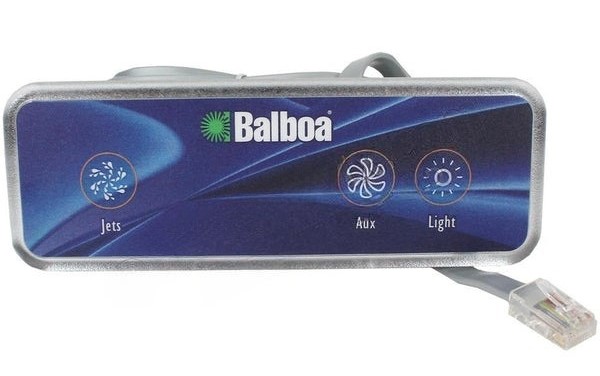
Balboa VX40S Aux Control (Jets 1, Blower and Light)
£107.80 Inc VAT
6 in stock
🎛️ Balboa VX40S Auxiliary Control Panel (Jets 1, Blower & Light) – Three-Button Remote Control for GS(DZ) Series Spas
Three-button auxiliary panel with Jets, Blower and Light control for GS(DZ) Series spa systems
📋 Product Overview
The Balboa VX40S Auxiliary Control Panel (TS-VX405) is a three-button auxiliary panel designed specifically for Balboa GS(DZ) Series spa systems. This panel provides remote control of Jets 1, Blower, and Light from a secondary location away from the main topside controls, offering comprehensive hydrotherapy and ambience control from one convenient panel.
Featuring a rectangular design with face dimensions of 190 mm × 58.4 mm, the VX40S fits into a rectangular cutout measuring 139 mm × 38 mm. Like other VX series panels, it features RJ45 connection and comes with an extended 5.5-metre cable length for flexible installation in larger spas. Operating at 12V, the panel connects via an RJ45 socket on the spa pack’s PCB.
Ideal for larger hot tubs where users need secondary controls for jets, air massage, and lighting away from the main topside panel, the VX40S allows comprehensive control from lounger positions or opposite ends of the spa. The overlay is included with this model, making it ready to install.
⭐ Key Features
- ✅ Three-Button Design – Jets 1, Blower, and Light control
- ✅ GS(DZ) Series Compatible – Designed for GS(DZ) spa systems
- ✅ RJ45 Connection – Easy plug-and-play installation
- ✅ Extended 5.5m Cable – Generous length for flexible positioning
- ✅ Rectangular Design – 190 mm × 58.4 mm face
- ✅ Standard Cutout – Fits 139 mm × 38 mm hole
- ✅ 12V Operation – Safe low voltage design
- ✅ Overlay Included – Ready to install immediately
- ✅ Comprehensive Control – Hydrotherapy, air massage, and lighting
- ✅ Genuine Balboa Quality – Manufactured to Balboa standards
🔧 Technical Specifications
| Specification | Value |
|---|---|
| Manufacturer | Balboa |
| Model | VX40S |
| Model Series | VX |
| Product Type | Auxiliary Panel |
| SKU | TS-VX405 |
| Number of Buttons | 3 |
| Button Functions | Jets 1, Blower, Light |
| Maximum Pumps Controlled | 1 |
| Blower / Aux | 1 |
| Face Length | 190 mm |
| Face Height | 58.4 mm |
| Hole Size Length | 139 mm |
| Hole Size Height | 38 mm |
| Cable Length | 5.5 m |
| Operating Voltage | 12V |
| Connection Type | RJ45 |
| Compatible Systems | GS(DZ) Series |
| Overlay Included | ✅ Yes |
| Box Quantity | 16 |
🔌 Compatibility Guide
This Auxiliary Panel is Compatible With:
| Spa Pack Series | Models | Confirmed |
|---|---|---|
| GS(DZ) Series | All GS(DZ) variants | ✅ |
NOT Compatible With:
- ❌ GL Series (GL2000, GL8000, etc.) – Use AX series instead
- ❌ BP Series – Use AX series instead
- ❌ GS Series (SZ and above) – Use VX20 instead
- ❌ Other GS variants – Check spa pack compatibility
Connection Requirements:
- Spa pack must be GS(DZ) Series
- Spa pack must have available RJ45 auxiliary port
- Spa must have Pump 1, Blower, and Light outputs configured
- 12V auxiliary power supply from spa pack
📍 How to Verify Compatibility:
- Check your spa pack is GS(DZ) Series
- Locate the RJ45 auxiliary port on your PCB
- Confirm your spa has Jets, Blower, and Light installed
⚠️ Important: The VX40S uses RJ45 connection and is ONLY compatible with GS(DZ) Series systems. For GL or BP systems, use AX series auxiliary panels. For GS(SZ) and above, use VX20.
🔘 Button Functions
Three-Button Operation:
| Button | Function | Action |
|---|---|---|
| JETS 1 | Pump 1 Control | Activate/cycle Jet Pump 1 |
| BLOWER | Air Blower Control | Activate air massage system |
| LIGHT | Lighting Control | Activate/cycle spa lighting |
Operating Notes:
- Press Jets 1 to activate primary jet pump for hydrotherapy massage
- Press Blower to activate air massage bubbles
- Press Light to turn on lighting or cycle through colours
- All three functions can operate simultaneously or independently
- Pump speed cycling depends on spa pack configuration
- Light and blower behaviour depends on your installed equipment
🔄 VX Series Comparison
VX Series Auxiliary Panel Range:
| Model | SKU | Buttons | Functions | Compatible Systems |
|---|---|---|---|---|
| VX20 | TS-VX204 | 2 | Configurable | GS Series (SZ+) |
| VX40S | TS-VX405 | 3 | Jets 1, Blower, Light | GS(DZ) Series |
Choose VX40S When:
- Your spa has a GS(DZ) Series control system
- You need Jets, Blower, AND Light control from one panel
- You want three-button comprehensive control
Choose VX20 When:
- Your spa has GS Series (SZ and above)
- You only need two-button control
💡 Three-Function Combination Benefits
Why Jets 1, Blower & Light is an Ideal Combination:
| Scenario | Benefit |
|---|---|
| Complete relaxation control | Hydrotherapy, air massage, and ambience |
| Evening spa sessions | Lighting plus massage options |
| Therapy positioning | All massage controls from lounger |
| Mood adjustment | Control jets, bubbles, and lighting together |
Typical Usage Combinations:
- Jets 1 + Light for powerful hydrotherapy with ambience
- Blower + Light for gentle air massage relaxation
- All three for complete spa experience
- Individual functions as needed
⚙️ Purpose & Application
What is an Auxiliary Panel?
Unlike main topside control panels that provide full spa control (temperature, all pumps, lights, modes), auxiliary panels are secondary controls designed to operate specific functions from remote locations around the spa.
Why Use a VX40S?
| Scenario | Benefit |
|---|---|
| GS(DZ) Series spas | Proper RJ45 compatibility |
| Large hot tubs with loungers | Control key functions from relaxed position |
| Evening spa sessions | Jets, blower, and lighting all accessible |
| Multi-user spas | Secondary access to main spa features |
Typical Installation Locations:
- Near lounger seating areas
- Opposite end of spa from main topside
- Near therapy seats
- Secondary user positions in large spas
🛠️ Installation Guide
Before Installation:
- ⚠️ Disconnect power to spa at the isolator/breaker before any work
- ⚠️ Verify your spa pack is GS(DZ) Series
- ⚠️ Locate available RJ45 auxiliary port on PCB
- ⚠️ Plan cable routing (5.5 m available length)
- ⚠️ Prepare rectangular 139 mm × 38 mm cutout at desired location
Installation Steps:
- Turn off power at the isolator/breaker
- Cut or prepare rectangular 139 mm × 38 mm hole at desired location
- Route the 5.5 m cable from installation point to spa pack
- Connect the RJ45 plug to the spa pack’s RJ45 auxiliary port
- Mount the VX40S panel in the rectangular cutout
- Apply included overlay
- Secure panel and ensure watertight seal
- Restore power and test all three buttons
Mounting Information:
| Specification | Detail |
|---|---|
| Face Size | 190 mm × 58.4 mm |
| Required Cutout | 139 mm × 38 mm (Rectangular) |
| Cable Length | 5.5 m |
| Connection | RJ45 plug |
| Mounting Type | Push-fit into rectangular hole |
⚠️ Professional installation recommended for drilling into spa shell and ensuring watertight sealing.
🔗 Wiring & Connection
Connector Information:
| Specification | Detail |
|---|---|
| Connector Type | RJ45 |
| Cable Length | 5.5 metres |
| Operating Voltage | 12V |
Connection Location:
The VX40S connects to the RJ45 auxiliary port on GS(DZ) Series spa packs. The RJ45 plug provides a secure, easy plug-and-play connection.
⚠️ Never force the connector. The RJ45 plug should click into place easily. If it doesn’t fit, verify you’re connecting to the correct port on a compatible GS(DZ) Series system.
🔍 Troubleshooting
Common Issues:
| Problem | Possible Cause | Solution |
|---|---|---|
| No buttons responding | No power or loose connection | Check power and reseat RJ45 connector |
| Jets 1 not working | Pump not configured or faulty | Check pump and spa pack settings |
| Blower not activating | Blower not installed or configured | Verify blower installation |
| Light not working | Bulb/LED faulty | Check light unit |
| RJ45 won’t connect | Wrong spa pack type | Verify GS(DZ) Series compatibility |
| Intermittent operation | Cable damage or poor connection | Inspect cable and RJ45 connector |
| Panel loose in hole | Incorrect cutout size | Check 139 × 38 mm cutout dimensions |
Important Notes:
- The VX40S is ONLY compatible with GS(DZ) Series
- If you have GL or BP Series, you need an AX series panel instead
- Verify your spa has all three components (Jets, Blower, Light) installed
🔩 Maintenance & Care
Routine Care:
| Task | Frequency |
|---|---|
| Wipe with soft damp cloth | Weekly |
| Check all button responses | Monthly |
| Inspect cable condition | Annually |
| Check watertight seal | Annually |
| Check overlay condition | Annually |
DO NOT:
- ❌ Use abrasive cleaners
- ❌ Pull or stress the cable
- ❌ Submerge RJ45 connection
- ❌ Force button operation
- ❌ Use on non-GS(DZ) Series systems
♨️ Ideal Applications
| Application | Suitability |
|---|---|
| ♨️ GS(DZ) Series spa systems | ✅ Ideal |
| ♨️ Large hot tubs (6+ person) | ✅ Ideal |
| ♨️ Spas with Jets, Blower, and Light | ✅ Ideal |
| ♨️ Lounger seating areas | ✅ Ideal |
| ♨️ Evening/relaxation sessions | ✅ Ideal |
| 🔄 Replacement for existing VX40S | ✅ Direct replacement |
| ❌ GL Series systems | ❌ Use AX series |
| ❌ BP Series systems | ❌ Use AX series |
| ❌ GS(SZ) Series systems | ❌ Use VX20 |
Common Installation Scenarios:
- 🛁 GS(DZ) Series spas with comprehensive features
- 💆 Spas needing jets, blower, and light control from secondary location
- ♨️ Premium GS(DZ) installations with lounger positions
- 🔄 Replacing faulty VX40S auxiliary panels
❓ Frequently Asked Questions
Q: What is the difference between VX40S and VX20?
A: The VX40S has 3 buttons controlling Jets 1, Blower, and Light, and is designed for GS(DZ) Series systems. The VX20 has 2 buttons with configurable functions and is designed for GS Series (SZ and above). They are for different GS Series variants.
Q: What is the difference between VX40S and AX40?
A: The VX40S uses RJ45 connection for GS(DZ) Series systems, while AX40 uses 6-pin connection for GL and BP Series systems. They are NOT interchangeable – use VX series for GS systems and AX series for GL/BP systems.
Q: Is my spa compatible with the VX40S?
A: The VX40S is compatible with GS(DZ) Series spa packs. Check your spa pack label to confirm it’s a GS(DZ) Series system.
Q: Is the overlay included?
A: Yes, the overlay is included with the TS-VX405.
Q: What size cutout do I need?
A: The VX40S requires a rectangular 139 mm × 38 mm cutout. The panel face is 190 mm × 58.4 mm.
Q: My spa doesn’t have a blower – can I still use this?
A: Yes, but the Blower button will have no effect. If you don’t need all three functions, consider a VX20 (2-button) panel instead.
Q: Is RJ45 the same as an ethernet cable?
A: The RJ45 connector is the same physical type used in ethernet cables, but it carries 12V power and control signals for the spa, not network data. Do not connect to ethernet/network equipment.
Q: Can all three functions run simultaneously?
A: Yes, Jets 1, Blower, and Light operate independently. You can run any combination at the same time.
🏆 Why Choose the Balboa VX40S (TS-VX405)
- ✅ GS(DZ) Series Compatible – Designed specifically for GS(DZ) systems
- ✅ Three-Button Control – Jets 1, Blower, and Light
- ✅ RJ45 Connection – Easy plug-and-play installation
- ✅ Extended Cable – 5.5m for greater reach
- ✅ Comprehensive Control – Hydrotherapy, air massage, and lighting
- ✅ Genuine Balboa Quality – Manufactured to Balboa standards
- ✅ Overlay Included – Ready to install immediately
- ✅ 12V Safety – Safe low voltage operation
🇬🇧 Why Buy from Parts4Tubs
- ✅ UK-based company with local support
- ✅ Fast UK delivery
- ✅ Expert advice from spa specialists
- ✅ Compatibility assistance for GS and GL systems
- ✅ Full warranty support
- ✅ Easy returns within 30 days
- ✅ Both VX and AX series available
✨ Summary
The Balboa VX40S Auxiliary Control Panel (TS-VX405) is a three-button auxiliary panel designed specifically for GS(DZ) Series spa systems. This panel provides remote control of Jets 1, Blower, and Light from a secondary location, offering comprehensive hydrotherapy, air massage, and ambience control. Featuring a rectangular 190 mm × 58.4 mm face that fits a 139 mm × 38 mm cutout, with extended 5.5-metre cable, 12V operation, and RJ45 connector. Compatible with GS(DZ) Series only – NOT for GL, BP, or other GS variants. Overlay included. Order from Parts4Tubs for fast UK delivery and expert compatibility advice.
| Part# | 52514 |
|---|
Related products
Control Boxes, Spa Packs & Topside Controls
Control Boxes, Spa Packs & Topside Controls
Control Boxes, Spa Packs & Topside Controls
Control Boxes, Spa Packs & Topside Controls
Control Boxes, Spa Packs & Topside Controls
Control Boxes, Spa Packs & Topside Controls
Control Boxes, Spa Packs & Topside Controls
Control Boxes, Spa Packs & Topside Controls