
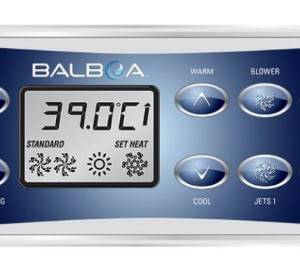
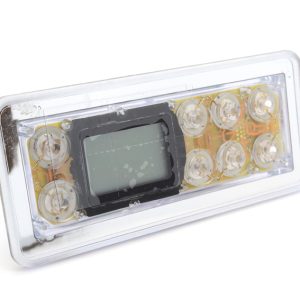
Balboa VL801D Touch Panel – No Overlay
£159.18 Inc VAT
1 in stock
🖥️ Balboa VL801D Topside Control Panel – Compatible with GS510DZ Series, Elite M7 & M3TUV
🌟 Advanced 8-button panel with Hi-Tec LCD display, time functions & component symbols for complete spa control
📋 Product Overview
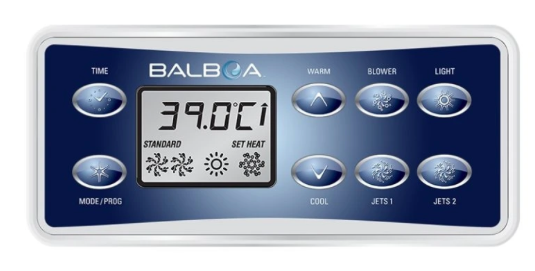
The Balboa VL801D Topside Control Panel is an advanced 8-button control interface featuring the most comprehensive button layout in the VL series. With its 187 mm × 83 mm design and Hi-Tec LCD large face screen, this panel provides complete spa control with dedicated TIME, MODE, temperature, blower, dual jets, and light controls – all with component symbols and advanced error message display.
The VL801D features an advanced Hi-Tec LCD screen that displays component symbols, time functions, and detailed error messages for superior system monitoring and diagnostics. Operating at 12V, this panel supports dual pump operation plus blower/auxiliary output, and connects via a telephone cord style connector for easy installation.
Designed for the advanced GS510DZ Series control systems including GS501DZ, GS510DZ, GS511DZ, and GS523DZ, as well as M3TUV and Elite M7 systems, the VL801D is compatible with a wide range of premium spa brands including Spaform SF273, Catalina, Hydrospa, Aegean, Hot Tubs Direct, Leisurerite, and DIY tubs by Hindhead Hot Tubs.
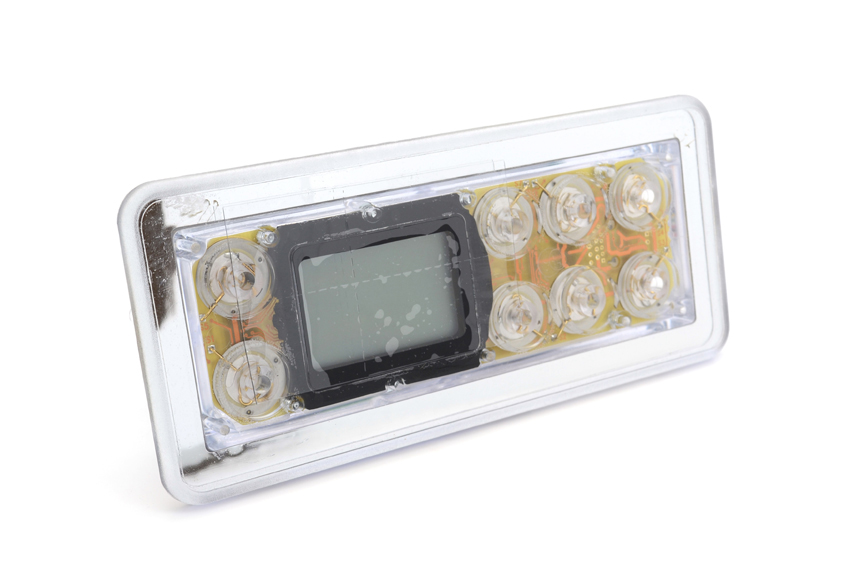
Please note: This panel is supplied without overlay. Overlay must be ordered separately.
⭐ Key Features
- ✅ 8-Button Interface – TIME, MODE, WARM, COOL, BLOWER, JETS 1, LIGHT, and JETS 2
- ✅ Hi-Tec LCD Display – Large face screen with component symbols
- ✅ Time Functions – Dedicated TIME button for clock and timer features
- ✅ Advanced Error Display – Detailed error message display for diagnostics
- ✅ Component Symbols – Visual indicators for active spa components
- ✅ Dual Pump Support – Independent control of Jets 1 and Jets 2
- ✅ Blower/Aux Support – Dedicated blower control button
- ✅ GS510DZ Series Compatible – Works with GS501DZ, GS510DZ, GS511DZ, GS523DZ
- ✅ Elite M7 Compatible – Works with Elite M7 control systems
- ✅ M3TUV Compatible – Works with M3TUV control systems
- ✅ Multi-Brand Compatible – Spaform SF273, Catalina, Hydrospa, Aegean, and more
- ✅ Telephone Cord Connection – Easy plug-and-play installation
🔧 Technical Specifications
| Specification | Value |
|---|---|
| Manufacturer | Balboa |
| Model | VL801D |
| Model Series | VL |
| Product Type | Topside Panel |
| SKU | TS-VL801 |
| Compatible Systems | GS501DZ, GS510DZ, GS511DZ, GS523DZ, M3TUV, Elite M7 |
| Compatible Brands | Spaform SF273, Catalina, Hydrospa, Aegean, Hot Tubs Direct, Leisurerite, DIY tubs by Hindhead Hot Tubs |
| Display Type | Hi-Tec LCD Large Face Screen |
| Display Features | Component Symbols, Time Functions, Advanced Error Messages |
| Number of Buttons | 8 |
| Button Configuration | TIME, MODE, WARM, COOL, BLOWER, JETS 1, LIGHT, JETS 2 |
| Dimensions (L × H) | 187 mm × 83 mm |
| Connection Type | Telephone Cord Style |
| Overlay Included | ❌ No (Sold Separately) |
| Status | ✅ ACTIVE |
🖥️ Display & Controls
Button Configuration:
| Button | Function |
|---|---|
| TIME | Access clock and timer functions |
| MODE | Access system modes and settings |
| WARM | Increase temperature setpoint |
| COOL | Decrease temperature setpoint |
| BLOWER | Activate/control air blower |
| JETS 1 | Activate/control jet pump 1 |
| LIGHT | Control spa lighting |
| JETS 2 | Activate/control jet pump 2 |
Display Features:
| Feature | Description |
|---|---|
| Display Type | Hi-Tec LCD Large Face Screen |
| Component Symbols | Visual indicators showing active components |
| Time Functions | Clock display and timer features |
| Error Messages | Advanced error message display for diagnostics |
| Temperature Display | Current/set water temperature |
Control Capabilities:
| Function | Availability |
|---|---|
| Pump 1 Control | ✅ (JETS 1 button) |
| Pump 2 Control | ✅ (JETS 2 button) |
| Blower/Aux Control | ✅ |
| Temperature Up | ✅ (WARM button) |
| Temperature Down | ✅ (COOL button) |
| Mode Selection | ✅ |
| Light Control | ✅ |
| Time/Clock Functions | ✅ (TIME button) |
🔗 Compatibility Guide
This Topside Control is Compatible With:
| Control System | Type | Confirmed |
|---|---|---|
| GS501DZ | GS510DZ Series | ✅ |
| GS510DZ | GS510DZ Series | ✅ |
| GS511DZ | GS510DZ Series | ✅ |
| GS523DZ | GS510DZ Series | ✅ |
| M3TUV | M3 Series | ✅ |
| Elite M7 | Elite Series | ✅ |
Compatible Spa Brands:
| Brand | Model/Series | Confirmed |
|---|---|---|
| Spaform | SF273 | ✅ |
| Catalina | Various | ✅ |
| Hydrospa | Various | ✅ |
| Aegean | Various | ✅ |
| Hot Tubs Direct | Various | ✅ |
| Leisurerite | Various | ✅ |
| DIY tubs by Hindhead Hot Tubs | Various | ✅ |
VL Panel Suffix Compatibility Rule:
- VL panels ending in D → VS/GS systems ending in DZ
- VL panels ending in S → VS/GS systems ending in SZ
- Other VL panels → VS/GS systems ending in Z (not SZ or DZ)
NOT Compatible With:
- ❌ GS500, GS500Z, GS501, GS501Z (use VL400 series instead)
- ❌ GS501SZ, GS510S, GS510SZ, GS511SZ (use VL701S or VL700S instead – “S” suffix panels)
- ❌ Standard Duplex systems (different control system)
How to Verify Compatibility:
- 📍 Check your existing topside model (VL801D)
- 📍 Confirm your spa pack has a DZ suffix (GS501DZ, GS510DZ, GS511DZ, GS523DZ)
- 📍 Or confirm your system is M3TUV or Elite M7
- 📍 Verify the connector type matches (telephone cord style)
- 📍 Contact Parts4Tubs if you require confirmation
⚠️ Important: The VL801D is designed for DZ suffix systems. Ensure your spa pack model ends in “DZ” before ordering.
⚙️ Installation Guide
Before Installation:
- ⚠️ Disconnect power to spa at the isolator/breaker before any work
- ⚠️ Verify compatibility with your spa pack system (must be DZ suffix, M3TUV, or Elite M7)
- ⚠️ Confirm connector type matches (telephone cord style)
- ⚠️ Order overlay separately – this panel does not include overlay
Installation Steps:
- Turn off power at the isolator/breaker
- Remove the existing topside panel from the mounting location
- Disconnect the telephone cord style cable from the spa pack
- Connect the new VL801D cable to the spa pack
- Mount the new topside panel in position
- If required, fit the separately ordered overlay
- Restore power and test all functions including both pumps, blower, and time functions
Mounting Information:
| Specification | Detail |
|---|---|
| Panel Dimensions | 187 mm × 83 mm |
| Profile | Standard VL format |
| Overlay | Not included – order separately |
| Connection | Telephone cord style |
⚠️ Professional installation recommended if you are unfamiliar with spa electronics.
⚡ Wiring & Connection
Connector Information:
| Specification | Detail |
|---|---|
| Connector Type | Telephone Cord Style |
Connection Location:
The VL801D connects to the topside port on compatible GS510DZ Series, M3TUV, and Elite M7 control systems via a telephone cord style connector.
⚠️ Never force the connector. If it doesn’t fit, verify compatibility with your control system.
🔍 Troubleshooting
Common Issues:
| Problem | Possible Cause | Solution |
|---|---|---|
| Blank display | No power or loose connection | Check power supply and reseat cable connector |
| Error codes displayed | Various system issues | VL801D shows advanced error messages – refer to spa pack manual |
| Buttons unresponsive | Overlay wear or panel fault | Check overlay condition (if fitted) |
| Incorrect readings | Temperature sensor issue | Check temperature sensor (separate component) |
| Display dim or flickering | Connection issue or power problem | Check and reseat telephone cord connector |
| Time display incorrect | Time not set | Use TIME button to set clock |
| Component symbols not showing | Normal operation or fault | Symbols only display when component is active |
| JETS 1 not working | Pump 1 issue | Check pump 1 connections and spa pack configuration |
| JETS 2 not working | Pump 2 issue | Check pump 2 connections and spa pack configuration |
| BLOWER not responding | Blower or wiring issue | Check blower connections |
Error Messages:
The VL801D features an advanced error message display that provides detailed diagnostic information. Error messages are determined by the spa pack. Refer to your spa pack manual for specific error code meanings.
🧹 Maintenance & Care
Routine Care:
| Task | Frequency |
|---|---|
| Wipe with soft damp cloth | Weekly |
| Check button response | Monthly |
| Inspect cable connection | Annually |
| Check overlay condition (if fitted) | Annually |
DO NOT:
- ❌ Use abrasive cleaners or scouring pads
- ❌ Submerge the panel in water
- ❌ Use solvent-based or chemical cleaners
- ❌ Press buttons with sharp objects
- ❌ Pull or strain the telephone cord connector
Overlay Information:
This panel is supplied without overlay. If overlay becomes worn or damaged, replacement overlays are available separately.
🎯 Ideal Applications
| Application | Suitability |
|---|---|
| 🔄 Replacement for faulty VL801D topside | ✅ Ideal |
| ⬆️ Upgrade to advanced control panel | ✅ Ideal |
| 🎛️ Spas with GS501DZ control systems | ✅ Compatible |
| 🎛️ Spas with GS510DZ control systems | ✅ Compatible |
| 🎛️ Spas with GS511DZ control systems | ✅ Compatible |
| 🎛️ Spas with GS523DZ control systems | ✅ Compatible |
| 🎛️ Spas with M3TUV control systems | ✅ Compatible |
| 🎛️ Spas with Elite M7 control systems | ✅ Compatible |
| ♨️ Spaform SF273 spas | ✅ Compatible |
| ♨️ Catalina spas | ✅ Compatible |
| ♨️ Hydrospa spas | ✅ Compatible |
| ♨️ Aegean spas | ✅ Compatible |
| ♨️ Hot Tubs Direct | ✅ Compatible |
| ♨️ Leisurerite spas | ✅ Compatible |
| ♨️ DIY tubs by Hindhead Hot Tubs | ✅ Compatible |
| 🏆 Premium spa installations requiring time functions | ✅ Ideal |
Common Replacement Scenarios:
- 💔 Cracked or damaged display
- 🔘 Unresponsive buttons
- 💧 Water damage to existing panel
- 👁️ Faded or dim display
- 🔌 Damaged telephone cord connector
- ⬆️ Upgrade to panel with time functions
❓ Frequently Asked Questions
Q: How do I know if this topside is compatible with my spa?
A: The VL801D is designed for Balboa GS510DZ Series control systems (GS501DZ, GS510DZ, GS511DZ, GS523DZ), M3TUV, and Elite M7 systems. Check your spa pack model number – it should end in “DZ” or be M3TUV/Elite M7.
Q: What is the difference between VL801D and VL701S?
A: The VL801D has 8 buttons (including TIME) with a Hi-Tec LCD display showing component symbols and advanced error messages. It’s compatible with “DZ” suffix systems. The VL701S has 7 buttons, Serial Standard display, and is compatible with “SZ” suffix systems. The VL801D is the more advanced panel.
Q: Why is the overlay sold separately?
A: The VL801D is supplied as a “naked” panel without overlay. This allows you to order the specific overlay for your spa brand or use your existing overlay if in good condition.
Q: What does the TIME button do?
A: The TIME button allows access to clock and timer functions on your spa. You can view/set the current time and program filtration cycles. Refer to your spa pack manual for specific time function features.
Q: What are the component symbols on the display?
A: The Hi-Tec LCD display shows visual symbols indicating which spa components are currently active (pumps, blower, heater, etc.). This provides at-a-glance status of your spa system.
Q: What makes the error messages “advanced”?
A: The VL801D displays detailed error messages from your spa pack rather than just simple error codes, making diagnostics easier.
Q: Is this panel compatible with GS510S or GS510SZ systems?
A: No. The VL801D (D suffix) is compatible with DZ suffix systems only. For SZ suffix systems like GS510SZ, use VL701S or VL700S panels instead.
Q: What is the connection type?
A: The VL801D uses a telephone cord style connector for easy plug-and-play installation.
Q: Is this product currently available?
A: Yes, the VL801D (TS-VL801) is an active product and currently available for order.
📥 Downloads & Resources
🏆 Why Choose the Balboa VL801D
- ✅ Most Buttons in VL Series – 8 buttons for comprehensive control
- ✅ Hi-Tec LCD Display – Large face screen with component symbols
- ✅ Time Functions – Dedicated TIME button for clock and timer features
- ✅ Advanced Error Display – Detailed diagnostic messages
- ✅ Genuine Balboa Quality – Manufactured to Balboa’s exacting standards
- ✅ Comprehensive Control – TIME, MODE, WARM, COOL, BLOWER, JETS 1, LIGHT, JETS 2
- ✅ Dual Pump Control – Independent JETS 1 and JETS 2 buttons
- ✅ Wide Compatibility – GS510DZ Series, M3TUV, Elite M7
- ✅ Multi-Brand Support – Spaform, Catalina, Hydrospa, Aegean, and more
- ✅ Telephone Cord Connection – Reliable plug-and-play installation
- ✅ Currently Available – Active product in stock
🤝 Why Buy from Parts4Tubs
- ✅ UK-based company with local support
- ✅ Fast UK delivery
- ✅ Expert advice from spa specialists
- ✅ GS510DZ Series, M3TUV, and Elite M7 compatibility assistance
- ✅ Full warranty support
- ✅ Easy returns within 30 days
- ✅ Overlays available separately
✨ Summary
The Balboa VL801D Topside Control Panel is an advanced 8-button control interface featuring the most comprehensive button layout in the VL series. Measuring 187 mm × 83 mm with a Hi-Tec LCD large face screen displaying component symbols, time functions, and advanced error messages, this panel provides control of TIME, MODE, WARM, COOL, BLOWER, JETS 1, LIGHT, and JETS 2 functions. Compatible with GS501DZ, GS510DZ, GS511DZ, GS523DZ, M3TUV, and Elite M7 control systems, plus major spa brands including Spaform SF273, Catalina, Hydrospa, Aegean, Hot Tubs Direct, Leisurerite, and DIY tubs by Hindhead Hot Tubs. The telephone cord style connection ensures easy installation.
Balboa BP Spa Packs
If you have a “BP” spa pack, you will find the name and model on the label, then you can use any of the “TP” range of topside controls, TP400, TP600 etc etc.
You can also use any of the “Spa Touch” graphical controllers on your Spa Pack. Spa Touch comes in versions 1-3 with 4 to be released very soon as well as the new “mini”.
The BP Spa Pack made things nice and easy so when you are replacing your topside control with one of these, it is straight forward enough.
Balboa VS & GS Spa Packs.
If you have an older hot tub that you are keeping alive with new parts, then the chances are you have an older spa pack in there too. This is where it gets a little more complicated in terms of compatibility.
Two of the popular models are the VS which stands for Value Series and was supplied to a lot of OEMs (manufacturers for hot tubs) to go into their tubs. Likewise, the GS (global series) was the same. Lots of different rebranded options, different names, but at the heart of things are these two packs.
What is key on these two models, is the combination of letters and numbers that make up the model number on the Spa Pack.
The VL range of topside controls was designed for both of these spa pack ranges; however, there are some “rules” we need to abide by in terms of compatibility.
VL Panels ending in D work with VS/GS systems ending in DZ
VL Panels ending in S work with VS/GS systems ending in SZ
The rest of the VL Panels work with VS/GS systems ending in Z (not SZ or DZ)
For example, a Spa Pack model VS501SZ would work nicely with a Topside that is model VL620S. However, that same topside control would not work with a spa pack model VS501Z. The connections are the same, it would plug in, but would not respond at all.
Another example, a Balboa GS500Z spa pack would work with the VL406T or the VL401 but would not work with the VL702S.
You get the patters. Topside ends in S or D, matches to Spa Pack ending in SZ (for S) or DZ (for D).
Balboa EL & GL Spa Packs
Before the birth of the BP range, the EL and GL Spa Packs did have some level of standardisation in terms of the topside controls.
All of the “ML” range of Balboa Topside Controls are designed to work with the EL and GL range of spa packs. They actually look very similar to the TP range, they just have a different type of connection to plug into the Spa Pack.
VL Panels ending in S work with VS/GS systems ending in SZ
The rest of the VL Panels work with VS/GS systems ending in Z (not SZ or DZ)
| Part# | 54108 |
|---|
Related products
Control Boxes, Spa Packs & Topside Controls
Control Boxes, Spa Packs & Topside Controls
Control Boxes, Spa Packs & Topside Controls
Balboa BP6013G3 Spa Control System | 3.0kW | Triple-Pump with M7 Technology
Control Boxes, Spa Packs & Topside Controls
Control Boxes, Spa Packs & Topside Controls
Control Boxes, Spa Packs & Topside Controls