
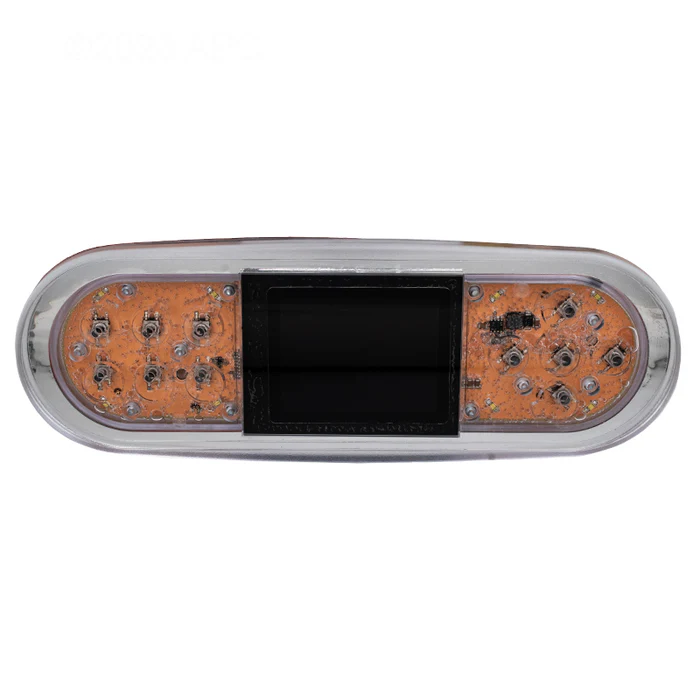
Balboa TP700 Topside Panel
£230.67 Inc VAT
9 in stock
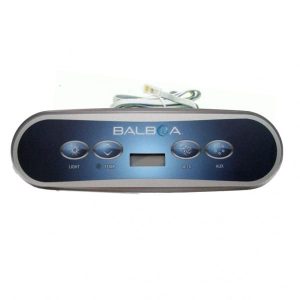
💆 Balboa TP700 Topside Control Panel – Compatible with All BP Series Control Systems
🖥️ Stylish design with hi-tech digital display for effortless spa management
📋 Product Overview
The Balboa TP700 Topside Control Panel is a sophisticated digital interface designed to work seamlessly with all Balboa BP Series control boxes. Featuring a sleek, elongated design measuring 250 mm × 90 mm, this panel provides an elegant and functional control solution for your hot tub.
Operating at 12V, the TP700 boasts a hi-tech digital large face screen that displays component symbols, time functions, and advanced error messages, giving you complete visibility of your spa’s operational status. With 10 buttons providing comprehensive control, this panel supports up to 3 pumps and 1 blower/auxiliary output, making it ideal for feature-rich spa installations.
The TP700 offers versatile installation options, multiple language support, and a user-friendly interface wrapped in a stylish design. The current Balboa part number is G8470, which replaces previous TP700 models (57278, 57280), ensuring you receive the latest version of this premium control panel.
✨ Key Features
- ✅ All BP Series Compatible – Works with the complete range of Balboa BP Series control boxes
- ✅ Hi-Tech Digital Display – Large face screen with component symbols for clear status monitoring
- ✅ 10-Button Interface – Comprehensive control layout for all spa functions
- ✅ Multi-Language Support – Easy navigation through multiple language options
- ✅ Advanced Error Display – Detailed error messages for efficient troubleshooting
- ✅ Time Functions – Built-in clock display and scheduling capabilities
- ✅ 3 Pump Support – Controls up to 3 pumps for full spa functionality
- ✅ Blower/Aux Control – Supports 1 blower or auxiliary output
- ✅ 12V Operation – Low voltage design for safe operation
- ✅ Stylish Design – Sleek elongated profile with user-friendly interface
- ✅ Versatile Installation – Flexible mounting options for various spa configurations
⚙️ Technical Specifications
| Specification | Value |
|---|---|
| Manufacturer | Balboa |
| Model | TP700 |
| Current Part Number | G8470 |
| Replaces Part Numbers | 57278, 57280 |
| Compatible Systems | All BP Series Control Boxes |
| Model Series | TP |
| Display Type | Hi-Tech Digital Large Face Screen |
| Number of Buttons | 10 |
| Maximum Pumps Supported | 3 |
| Blower/Auxiliary Outputs | 1 |
| Operating Voltage | 12V |
| Dimensions (L × H) | 250 mm × 90 mm |
| Connection Type | 4 Black Plastic Pins (Grid Formation) |
| Overlay Included | No |
| Multi-Language | Yes |
🔌 Compatibility Guide
This Topside Control is Compatible With:
| Control System | Confirmed |
|---|---|
| All BP Series Control Boxes | ✅ |
How to Verify Compatibility:
- 📍 Check your existing topside for part number (G8470, 57278, or 57280)
- 📍 Confirm your spa pack is a Balboa BP Series control box
- 📍 Verify the connector type matches (4 black plastic pins in grid formation)
- 📍 Contact Parts4Tubs if you require confirmation
⚠️ Important: Topside controls are system-specific. Installing an incompatible topside will not work and may cause error codes.
🖥️ Display & Controls
Display Features:
| Feature | Description |
|---|---|
| Screen Type | Hi-Tech Digital Large Face Display |
| Component Symbols | Visual icons for pumps, blower, heating, and system status |
| Time Functions | Clock display and scheduling features |
| Error Messages | Advanced diagnostic error display |
| Language Options | Multiple languages with easy navigation |
Control Capabilities:
| Function | Availability |
|---|---|
| Pump 1 Control | ✅ |
| Pump 2 Control | ✅ |
| Pump 3 Control | ✅ |
| Blower/Aux Control | ✅ |
| Temperature Adjustment | ✅ |
| Time/Clock Functions | ✅ |
| System Diagnostics | ✅ |
🛠️ Installation Guide
Before Installation:
- ⚠️ Disconnect power to spa at the isolator/breaker before any work
- ⚠️ Verify compatibility with your BP Series spa pack
- ⚠️ Confirm connector type matches your existing installation
Installation Steps:
- Turn off power at the isolator/breaker
- Remove the existing topside panel from the mounting location
- Disconnect the cable connector from the spa pack
- Connect the new TP700 cable to the spa pack (4 black plastic pins in grid formation)
- Mount the new topside panel in position
- Restore power and test all functions
Mounting Information:
| Specification | Detail |
|---|---|
| Panel Dimensions | 250 mm × 90 mm |
| Installation Type | Versatile mounting options |
| Mounting | Refer to installation manual for cutout requirements |
⚠️ Professional installation recommended if you are unfamiliar with spa electronics.
⚡ Wiring & Connection
Connector Information:
| Specification | Detail |
|---|---|
| Connector Type | 4 Black Plastic Pins in Grid Formation |
| Operating Voltage | 12V |
Connection Location:
The TP700 connects to the topside port on Balboa BP Series control systems.
⚠️ Never force the connector. If it doesn’t fit, verify compatibility with your control system.
⚠️ Troubleshooting
Common Issues:
| Problem | Possible Cause | Solution |
|---|---|---|
| Blank display | No power or loose connection | Check power supply and reseat cable connector |
| Error codes displayed | Various system issues | Refer to BP Series spa pack manual for error meanings |
| Buttons unresponsive | Overlay wear or moisture ingress | Inspect overlay condition; replacement overlay may be required |
| Incorrect readings | Temperature sensor issue | Check temperature sensor (separate component from topside) |
| Partial display | Display fault | Replacement may be needed |
| Language incorrect | Settings configuration | Navigate menu to adjust language settings |
Error Codes:
Error codes are determined by the spa pack, not the topside panel itself. The TP700 displays advanced error messages from your BP Series control system. Refer to your spa pack manual for specific error code meanings.
🧹 Maintenance & Care
Routine Care:
| Task | Frequency |
|---|---|
| Wipe with soft damp cloth | Weekly |
| Check button response | Monthly |
| Inspect cable connection | Annually |
| Check overlay condition | Annually |
DO NOT:
- ❌ Use abrasive cleaners or scouring pads
- ❌ Submerge the panel in water
- ❌ Use solvent-based or chemical cleaners
- ❌ Press buttons with sharp objects
- ❌ Apply excessive pressure to the display
Overlay Information:
The TP700 is supplied without an overlay. If your existing overlay becomes worn, faded, or buttons become unresponsive, a replacement overlay may be required. Contact Parts4Tubs for compatible overlay options.
🎯 Ideal Applications
| Application | Suitability |
|---|---|
| 🔄 Replacement for faulty TP700 topside | ✅ Ideal |
| ⬆️ Upgrade from earlier TP700 models (57278, 57280) | ✅ Ideal |
| 🎛️ Spas with BP Series control systems | ✅ Compatible |
| 💨 Systems requiring blower/aux control | ✅ Compatible |
| 🔧 Multi-pump spa installations (up to 3 pumps) | ✅ Compatible |
Common Replacement Scenarios:
- 💔 Cracked or damaged display screen
- 🔘 Unresponsive buttons
- 💧 Water damage to existing panel
- 👁️ Faded or illegible display
- ⬆️ Upgrading from legacy TP700 models
💬 Frequently Asked Questions
Q: How do I know if this topside is compatible with my spa?
A: The TP700 is compatible with all Balboa BP Series control boxes. Check your spa pack to confirm it is a BP Series system. Contact Parts4Tubs if you need assistance.
Q: Is the overlay included with this topside?
A: No, the overlay is not included with the TP700. If you require a new overlay, please contact Parts4Tubs for compatible options.
Q: What is the connection type?
A: The TP700 uses 4 black plastic pins in a grid formation to connect to your BP Series spa pack.
Q: Will this display error codes?
A: Yes, the TP700 features advanced error message display capabilities. Error codes originate from your spa pack, so refer to your BP Series manual for specific error meanings.
Q: What part numbers does this replace?
A: The current G8470 part number replaces previous TP700 models: 57278 and 57280.
Q: Can I install this myself?
A: If you are comfortable working with spa electronics and can safely isolate power, DIY installation is possible. The TP700 offers versatile installation options. However, professional installation is recommended if you are unfamiliar with spa electrical systems.
Q: How many pumps can this control?
A: The TP700 supports control of up to 3 pumps plus 1 blower or auxiliary output.
Q: Does this support multiple languages?
A: Yes, the TP700 offers multiple language support with easy navigation through language options.
📥 Downloads & Resources
⭐ Why Choose the Balboa TP700
- ✅ Genuine Balboa Quality – Manufactured to Balboa’s exacting standards
- ✅ Hi-Tech Digital Display – Large face screen with clear component symbols
- ✅ Comprehensive Control – 10 buttons for up to 3 pumps and 1 blower/aux
- ✅ Multi-Language Support – Accessible to users across different regions
- ✅ Advanced Diagnostics – Detailed error messages for efficient troubleshooting
- ✅ Stylish Design – Sleek elongated profile enhances spa aesthetics
- ✅ Versatile Installation – Flexible mounting for various configurations
- ✅ Current Production – G8470 ensures you receive the latest version
🇬🇧 Why Buy from Parts4Tubs
- ✅ UK-based company with local support
- ✅ Fast UK delivery
- ✅ Expert advice from spa specialists
- ✅ Compatibility assistance available
- ✅ Full warranty support
- ✅ Easy returns within 30 days
- ✅ Replacement overlays and accessories available
💫 Summary
The Balboa TP700 Topside Control Panel (G8470) delivers premium digital control for spas equipped with BP Series control systems. Featuring a stylish elongated design, hi-tech large face display with component symbols, 10-button interface, support for up to 3 pumps and 1 blower/aux, plus multi-language capability, this panel provides comprehensive spa management in an elegant package. Compatible with all BP Series control boxes, the TP700 is the ideal replacement or upgrade for your spa control needs. Order from Parts4Tubs for fast UK delivery and expert support.
Balboa BP Spa Packs
If you have a “BP” spa pack, you will find the name and model on the label, then you can use any of the “TP” range of topside controls, TP400, TP600 etc etc.
You can also use any of the “Spa Touch” graphical controllers on your Spa Pack. Spa Touch comes in versions 1-3 with 4 to be released very soon as well as the new “mini”.
The BP Spa Pack made things nice and easy so when you are replacing your topside control with one of these, it is straight forward enough.
Balboa VS & GS Spa Packs.
If you have an older hot tub that you are keeping alive with new parts, then the chances are you have an older spa pack in there too. This is where it gets a little more complicated in terms of compatibility.
Two of the popular models are the VS which stands for Value Series and was supplied to a lot of OEMs (manufacturers for hot tubs) to go into their tubs. Likewise, the GS (global series) was the same. Lots of different rebranded options, different names, but at the heart of things are these two packs.
What is key on these two models, is the combination of letters and numbers that make up the model number on the Spa Pack.
The VL range of topside controls was designed for both of these spa pack ranges; however, there are some “rules” we need to abide by in terms of compatibility.
VL Panels ending in D work with VS/GS systems ending in DZ
VL Panels ending in S work with VS/GS systems ending in SZ
The rest of the VL Panels work with VS/GS systems ending in Z (not SZ or DZ)
For example, a Spa Pack model VS501SZ would work nicely with a Topside that is model VL620S. However, that same topside control would not work with a spa pack model VS501Z. The connections are the same, it would plug in, but would not respond at all.
Another example, a Balboa GS500Z spa pack would work with the VL406T or the VL401 but would not work with the VL702S.
You get the patters. Topside ends in S or D, matches to Spa Pack ending in SZ (for S) or DZ (for D).
Balboa EL & GL Spa Packs
Before the birth of the BP range, the EL and GL Spa Packs did have some level of standardisation in terms of the topside controls.
All of the “ML” range of Balboa Topside Controls are designed to work with the EL and GL range of spa packs. They actually look very similar to the TP range, they just have a different type of connection to plug into the Spa Pack.
VL Panels ending in S work with VS/GS systems ending in SZ
The rest of the VL Panels work with VS/GS systems ending in Z (not SZ or DZ)
Related products
Control Boxes, Spa Packs & Topside Controls
Control Boxes, Spa Packs & Topside Controls
Control Boxes, Spa Packs & Topside Controls
Control Boxes, Spa Packs & Topside Controls
Control Boxes, Spa Packs & Topside Controls
Control Boxes, Spa Packs & Topside Controls
Control Boxes, Spa Packs & Topside Controls
Control Boxes, Spa Packs & Topside Controls