
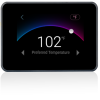
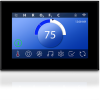
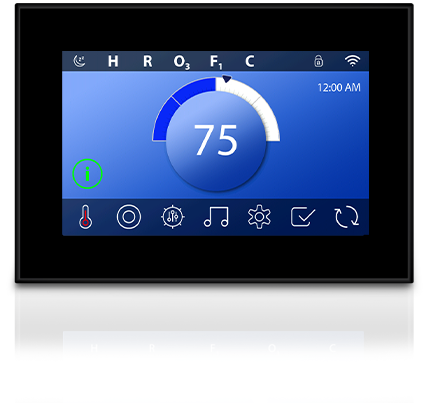
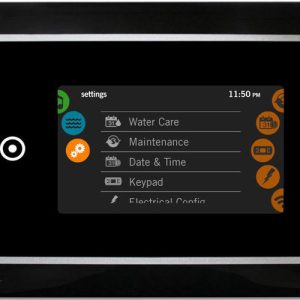
Balboa Spa Touch 3 + Clear Panel 7″ Display
£483.26 Inc VAT
Out of stock
Want to be notified when this product is back in stock?
🛁 Balboa Spa Touch 3 Clear Panel Topside Control – Compatible with BP Series Systems
Intuitive touchscreen technology for effortless hot tub management and control
📋 Product Overview
The Balboa Spa Touch 3 Clear Panel is a third-generation touchscreen topside control designed for seamless integration with Balboa BP Series spa systems. Featuring a high-resolution 5-inch capacitive touchscreen display that is twice as bright as its predecessor, this premium control panel delivers crystal-clear visibility in all lighting conditions.
Built with advanced waterproof technology and a fully potted motherboard, the Spa Touch 3 withstands environmental challenges including water splashes and contamination whilst maintaining responsive operation. The intuitive icon-driven interface allows you to effortlessly manage temperature settings, jet controls, lighting, and filter cycles with just a touch.
Whether you’re replacing a faulty topside panel or upgrading from an older SpaTouch model, this control delivers modern functionality with a sleek, contemporary aesthetic. The clear frame bezel complements any spa design, and the complete unit ships ready to install without requiring a separate overlay.
⭐ Key Features
- ✅ Capacitive Touchscreen Technology – Responsive 5-inch colour display similar to smartphone technology, remains functional even with wet hands
- ✅ 2x Brighter Display – Enhanced visibility compared to SpaTouch 2, ensuring clear readouts in bright sunlight or dim evening conditions
- ✅ Fully Potted Motherboard – Specialised gel coating creates a watertight seal for superior protection and long-term durability
- ✅ BP Series Compatible – Works with all Balboa BP systems supporting TP800 and TP900 panels
- ✅ 7-Foot Cable with 4-Pin Molex Connector – Generous cable length for flexible installation positioning
- ✅ Complete Unit – Ships ready to install with no separate overlay required
- ✅ Icon-Driven Interface – Intuitive navigation with clear symbols for temperature, jets, lighting, and settings
- ✅ Sleep Mode Feature – Instantly activate or put the panel to sleep with a quick tap
- ✅ Multi-Language Support – Multiple language options for international users
- ✅ Real-Time Feedback – On-screen notifications and status indicators keep you informed of spa operation
🔧 Technical Specifications
| Specification | Value |
|---|---|
| Compatible System | Balboa BP Series |
| Part Number | 57254, 57254-08 (also known as G8535) |
| Display Type | Capacitive Colour Touchscreen |
| Display Size | 5 inches (127 mm diagonal) |
| Panel Dimensions | 185 mm × 117 mm (L × W) |
| Alternative Dimensions | 146 mm × 102 mm (5¾” × 4″) |
| Cutout Size | 127 mm × 84 mm (5″ × 3-5/16″) |
| Cable Length | 2.1 metres (7 feet) |
| Connector Type | 4-Pin Molex |
| Operating Voltage | 12V DC |
| Overlay Required | No – Complete unit |
| Frame Colour | Clear |
| Panel Shape | Rectangular |
| Backlit Display | Yes |
| Waterproof | Yes – Fully potted electronics |
| Certifications | CE Marked |
🔗 Compatibility Guide
This Topside Control is Compatible With:
| Spa Pack Model | Series | Confirmed |
|---|---|---|
| BP100 | BP Series | ✅ |
| BP200G1, G2, G3 | BP Series | ✅ |
| BP200UX | BP Series | ✅ |
| BP501G1, G2, G3 | BP Series | ✅ |
| BP600 | BP Series | ✅ |
| BP601 | BP Series | ✅ |
| BP6013G1, 3G2, 3G3 | BP Series | ✅ |
| BP2000G1, G2, G3 | BP Series | ✅ |
| BP2100G1, G2, G3 | BP Series | ✅ |
| BP7 | BP Series | ✅ |
Systems Must Support: TP800 and/or TP900 topside panels for full functionality.
Limited Compatibility:
- ⚠️ Systems supporting only TP400 (Model T or W) and/or TP600 – Many screens will work correctly, but the spa screen may not display all equipment properly.
NOT Compatible With:
- ❌ Balboa EL Series spa packs
- ❌ Balboa GL Series spa packs
- ❌ Balboa GS Series spa packs (require VL series topsides)
How to Verify Compatibility:
📍 Locate your spa pack – typically found in the equipment bay 📍 Check the label for model number (e.g., BP501G2, BP2100G1) 📍 Verify your current topside connector type matches the 4-pin Molex 📍 Contact Parts4Tubs if you need assistance confirming compatibility
⚠️ Important: Topside controls are system-specific. Installing an incompatible topside will result in error codes or non-functioning controls.
🖥️ Display & Controls
Home Screen Features:
| Display Element | Function |
|---|---|
| Temperature Display | Shows current water temperature and set point |
| Mode Indicator | Displays Ready Mode, Rest Mode, or current operating status |
| Filter Cycle Status | Shows F1 or F2 when filter cycles are running |
| Heating Indicator | Displays when heater is actively warming water |
| Ozone Status | Shows O3 when ozone system is operating |
| High Temperature Alert | Indicates H when high temp range is selected |
| Clean-up Cycle | Shows C when clean-up cycle is active |
Touch Control Functions:
| Control | Action |
|---|---|
| Temperature Adjustment | Tap temperature area, use on-screen controls to adjust set point |
| Jets | Tap jet icons to cycle through off, low, and high speeds |
| Lighting | Tap light icon to control spa lighting and Chromazon3 features |
| Settings | Access filter cycles, heat modes, time settings, and preferences |
| Sleep/Wake | Double-tap to wake panel, single-tap sleep button to dim |
| Lock | Enable panel lock to prevent accidental changes |
Error Code Display: The topside displays diagnostic error codes generated by the spa pack. Common codes include:
- OH – Overheat condition detected
- Pr – Priming mode active
- dr – Inadequate water detected
- HL – High limit switch activated
- FLO – Flow switch issue
Refer to your spa pack manual for complete error code definitions.
🔌 Installation Guide
Before Installation:
- ⚠️ Disconnect power to the spa at the isolator or circuit breaker
- ⚠️ Verify the Spa Touch 3 is compatible with your spa pack model
- ⚠️ Confirm the 7-foot cable length is sufficient to reach from mounting location to spa pack
- ⚠️ Check that the cutout size matches your existing topside opening
Installation Steps:
- Isolate Power – Turn off power at the main isolator and confirm spa is completely de-energised
- Remove Existing Panel – Carefully release clips or remove screws securing the old topside
- Disconnect Old Cable – Unplug the existing topside connector from the spa pack
- Route New Cable – Thread the Spa Touch 3 cable through to the spa pack location
- Connect to Spa Pack – Insert the 4-pin Molex connector into the appropriate port on the spa pack
- Mount New Panel – Position the Spa Touch 3 in the cutout and secure with clips or mounting hardware
- Restore Power – Re-energise the spa and verify the touchscreen activates
Mounting Requirements:
| Requirement | Specification |
|---|---|
| Cutout Size | 127 mm × 84 mm (5″ × 3-5/16″) |
| Mounting Type | Snap-in with clips |
| Recommended Angle | Minimum 10° angle from horizontal |
| Cover Clearance | Ensure spa cover does not contact touchscreen surface |
⚠️ Professional installation is recommended if you are unfamiliar with spa electrical systems. Incorrect installation may void the warranty.
⚡ Wiring & Connection
Connector Information:
| Specification | Detail |
|---|---|
| Connector Type | 4-Pin Molex |
| Pin Configuration | 4 black plastic pins in grid formation |
| Cable Length | 2.1 metres (7 feet) |
| Cable Type | Low-voltage data cable |
| Extension Available | Contact Parts4Tubs for extension cable options |
Connection Location: The Spa Touch 3 connects to the topside port on your Balboa BP series spa pack. This is typically labelled as:
- “TP” or “Topside” on BP501 systems
- Panel connector port on BP2100 systems
⚠️ Never force the connector. The 4-pin Molex should insert smoothly. If resistance is encountered, verify you have the correct orientation and compatible spa pack.
🔍 Troubleshooting
Common Issues:
| Problem | Possible Cause | Solution |
|---|---|---|
| Blank display | No power to spa pack | Check isolator and circuit breaker are on |
| Blank display | Loose cable connection | Verify Molex connector is fully seated at spa pack |
| Display flickers | Damaged cable | Inspect cable for damage, replace if necessary |
| Touchscreen unresponsive | Panel in sleep mode | Double-tap screen to wake |
| Touchscreen unresponsive | Panel lock enabled | Check if lock icon is displayed, follow unlock procedure |
| Error codes displayed | Spa pack fault | Refer to spa pack manual for specific error meanings |
| Incorrect temperature shown | Sensor fault | Temperature sensor issue – not topside related |
| Jets won’t activate | Spa in priming mode | Wait for priming cycle to complete |
Resetting the Panel: If the touchscreen becomes unresponsive, power cycle the spa by turning off the isolator for 30 seconds, then restoring power.
Error Codes: Error codes are generated by the spa pack control system, not the topside panel. The Spa Touch 3 simply displays these codes. Consult your Balboa BP series spa pack manual for error code definitions and resolution steps.
🛠️ Maintenance & Care
Routine Care:
| Task | Frequency |
|---|---|
| Wipe screen with soft damp cloth | Weekly |
| Check display clarity and responsiveness | Monthly |
| Inspect cable connection at spa pack | Annually |
| Verify all touch functions operate correctly | Annually |
Cleaning Guidelines:
- ✅ Use a soft, lint-free cloth dampened with water
- ✅ Mild soap solution is acceptable for stubborn marks
- ✅ Dry thoroughly after cleaning
DO NOT:
- ❌ Use abrasive cleaners or scouring pads
- ❌ Apply solvents, alcohol, or chemical cleaners
- ❌ Submerge the panel in water
- ❌ Use high-pressure water spray directly on the touchscreen
- ❌ Press the screen with sharp objects
Protecting Your Investment: Although the Spa Touch 3 is waterproof, avoiding direct prolonged water exposure will extend its service life. Ensure your spa cover does not rest against the touchscreen surface when closed.
🎯 Ideal Applications
| Application | Suitability |
|---|---|
| ♨️ Replacement for faulty SpaTouch topside | ✅ Ideal |
| ♨️ Upgrade from SpaTouch 1 or SpaTouch 2 | ✅ Ideal |
| ♨️ Replacement for damaged TP800 or TP900 button panels | ✅ Compatible |
| ♨️ Hot tubs with Balboa BP Series control systems | ✅ Compatible |
| ♨️ Swim spas with Balboa BP Series systems | ✅ Compatible |
Common Replacement Scenarios:
- Cracked or physically damaged touchscreen
- Unresponsive or intermittent touch functionality
- Water damage to existing panel
- Faded or dim display (upgrading from older models)
- Upgrading from button-style TP panels to touchscreen interface
Replaces Part Numbers: 50391, 50402, 50404, 50584, 50586, 50587, 50588, 50589, 57179, 57180, 57254, 57255, 57329, 30-635-0610, 34-50587-K, 34-57179-K, 34-57328-K, 50390-04, 50610-01, 58-138-3386, 58-138-3452, G8524, G8535, X310213, X509124
❓ Frequently Asked Questions
Q: How do I know if this topside is compatible with my spa? A: Check your spa pack model number on the label (typically in the equipment bay). The Spa Touch 3 is compatible with Balboa BP Series systems including BP100, BP501, BP600, BP601, BP2000, BP2100, and BP7 models that support TP800/TP900 panels. Contact Parts4Tubs if you need assistance verifying compatibility.
Q: Is the overlay included? A: Yes, the Spa Touch 3 is a complete unit with an integrated touchscreen – no separate overlay is required or available.
Q: What is the cable length? A: The cable length is 2.1 metres (7 feet). If you require a longer reach, contact Parts4Tubs about extension cable options.
Q: Will this display error codes? A: Yes, the Spa Touch 3 displays all error codes generated by your spa pack. The codes themselves are determined by the spa pack, so refer to your Balboa BP series manual for error definitions.
Q: Can I install this myself? A: If you are comfortable working with spa electronics and can safely isolate power, DIY installation is straightforward. The panel connects via a single 4-pin Molex plug. However, if you are unfamiliar with spa systems, professional installation is recommended.
Q: What warranty is included? A: The Balboa Spa Touch 3 is covered by the manufacturer warranty. Contact Parts4Tubs for full warranty terms and conditions.
Q: Will this work if my current topside is a button panel (TP800 or TP900)? A: Yes, if your spa pack supports TP800 or TP900 panels, it will also support the Spa Touch 3 touchscreen. Both use the same communication protocol.
Q: Can I use this with my Balboa GS500Z or other GS series system? A: No, the Spa Touch 3 is not compatible with GS series spa packs. GS systems require VL series topside controls.
Q: How do I adjust the temperature? A: Tap the temperature display area on the home screen, then use the on-screen up and down controls to set your desired temperature. Changes take effect immediately.
Q: What does the sleep button do? A: The sleep feature dims the display to conserve energy and reduce light output at night. Double-tap anywhere on the screen to wake the panel.
📥 Downloads & Resources
📄 SpaTouch 3 User Guide (English) – Complete operation manual
🏆 Why Choose the Balboa Spa Touch 3
- ✅ Industry-Leading Brand – Balboa is the world’s largest manufacturer of spa control systems
- ✅ Latest Technology – Third-generation touchscreen with capacitive touch for responsive operation
- ✅ Superior Visibility – 2x brighter display than previous generation ensures clear viewing in any conditions
- ✅ Waterproof Construction – Fully potted electronics provide lasting protection against moisture
- ✅ Easy Upgrade Path – Direct replacement for older SpaTouch models and TP800/TP900 button panels
- ✅ Intuitive Interface – Icon-driven menus make spa control simple for all users
- ✅ Comprehensive Compatibility – Works with the full range of Balboa BP series spa packs
🤝 Why Buy from Parts4Tubs
- ✅ UK-based company with local customer support
- ✅ Fast UK delivery on in-stock items
- ✅ Expert advice from hot tub and spa specialists
- ✅ Compatibility assistance – we can help verify the right part for your spa
- ✅ Full warranty support and after-sales service
- ✅ Easy returns within 30 days
- ✅ Genuine Balboa products sourced from authorised channels
✨ Summary
The Balboa Spa Touch 3 Clear Panel delivers modern touchscreen control for Balboa BP Series hot tubs. With its responsive 5-inch capacitive display, waterproof construction, and intuitive icon-driven interface, this premium topside control makes managing your spa effortless. Compatible with all major BP series spa packs including BP501, BP2000, and BP2100 systems, the Spa Touch 3 is the ideal replacement or upgrade for your existing topside panel. Order from Parts4Tubs for fast UK delivery and expert support.
Related products
Control Boxes, Spa Packs & Topside Controls
Control Boxes, Spa Packs & Topside Controls
Control Boxes, Spa Packs & Topside Controls
Control Boxes, Spa Packs & Topside Controls
Control Boxes, Spa Packs & Topside Controls
Control Boxes, Spa Packs & Topside Controls
Balboa BP6013G3 Spa Control System | 3.0kW | Triple-Pump with M7 Technology
Control Boxes, Spa Packs & Topside Controls