
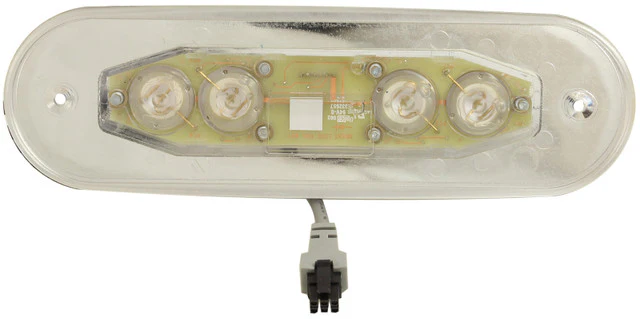
Balboa AX40 Auxiliary Panel
£98.10 Inc VAT
5 in stock
♨️ Balboa AX40 Auxiliary Control Panel – Complete Four-Button Control for Premium Spas
Full-featured auxiliary panel with four-button control of Jets 1, Jets 2, Blower and Light from a secondary location
📋 Product Overview
The Balboa AX40 Auxiliary Control Panel (TS-AX400) is the current production model and the most comprehensive auxiliary panel in the AX series. Featuring four buttons, it provides complete remote control of Jets 1, Jets 2, Blower, and Light from a secondary location away from the main topside controls. This panel offers virtually full spa control without needing to reach the main control panel.
Featuring the largest design in the AX series with 193 mm length, the AX40 fits into a rectangular cutout measuring 135 mm × 33 mm – different from the circular cutouts used by AX10 and AX20 panels. The panel comes with a generous 5-metre cable length for flexible installation positioning. Operating at 12V, it connects via a 6-pin connector (2 rows of 3 pins) to the spa pack’s auxiliary port.
This model (TS-AX400) uses the current Balboa reference G8940 and replaces previous AX40 topsides including part numbers 52678, 52681, and 52799. Compatible with all GL Series control systems including GL2000 and GL8000, as well as BP systems. Please note that the overlay is not included with this model and must be purchased separately.
⭐ Key Features
- ✅ Current Production Model – Balboa reference G8940
- ✅ Four-Button Design – Most comprehensive auxiliary control
- ✅ Complete Function Control – Jets 1, Jets 2, Blower, and Light
- ✅ Two Pump Control – Operate both jet pumps independently
- ✅ Blower Control – Air massage activation
- ✅ Light Control – Spa lighting and ambience
- ✅ 5-Metre Cable – Long reach for flexible positioning
- ✅ Largest AX Panel – 193 mm length
- ✅ 12V Operation – Safe low voltage design
- ✅ 6-Pin Connection – 2 rows of 3 pins connector
- ✅ Wide Compatibility – All GL Series and BP systems
- ✅ Replaces Multiple Models – Direct replacement for 52678, 52681, 52799
⚠️ Important: Overlay NOT included – must be purchased separately.
🔧 Technical Specifications
| Specification | Value |
|---|---|
| Manufacturer | Balboa |
| Model | AX40 |
| Model Series | AX |
| Product Type | Auxiliary Panel |
| SKU | TS-AX400 |
| Balboa Reference | G8940 |
| Replaces Part Numbers | 52678, 52681, 52799 |
| Number of Buttons | 4 |
| Button Functions | Jets 1, Jets 2, Blower, Light |
| Maximum Pumps Controlled | 2 |
| Blower / Aux | 1 |
| Cable Length | 5 m |
| Panel Length/Diameter | 193 mm |
| Cutout Size | 135 mm × 33 mm (Rectangular) |
| Operating Voltage | 12V |
| Connection Type | 6 Small Plastic Pins (2 Rows of 3) |
| Overlay Included | ❌ No – Sold Separately |
| Status | ✅ ACTIVE |
🔄 Replacement Information
This Model Replaces:
| Old Part Number | Old SKU | Status |
|---|---|---|
| 52678 | – | ⚠️ Discontinued |
| 52681 | – | ⚠️ Discontinued |
| 52799 | – | ⚠️ Discontinued |
| AX40 (with overlay) | TS-AX401 | ⚠️ Discontinued |
Current Model:
| New Balboa Ref | New SKU | Status |
|---|---|---|
| G8940 | TS-AX400 | ✅ ACTIVE |
If you have an existing AX40 with part number 52678, 52681, 52799, or TS-AX401, the TS-AX400 is the correct replacement. Remember to purchase an overlay separately if required.
🔌 Compatibility Guide
This Auxiliary Panel is Compatible With:
| Spa Pack Series | Models | Confirmed |
|---|---|---|
| GL Series | All GL Systems | ✅ |
| GL2000 | All variants | ✅ |
| GL8000 | All variants | ✅ |
| BP Series | BP systems | ✅ |
Connection Requirements:
- Spa pack must have available 6-pin auxiliary port
- Spa must have Pump 1, Pump 2, Blower, and Light outputs configured
- 12V auxiliary power supply from spa pack
📍 How to Verify Compatibility:
- Check your spa pack has a 6-pin auxiliary connector port
- Confirm your spa has two jet pumps, blower, and light installed
- Verify all outputs are configured on your system
⚠️ Important: This panel controls all four functions. If your spa doesn’t have all components (e.g., no blower), that button will have no effect.
🎛️ Button Functions
Four-Button Operation:
| Button | Function | Action |
|---|---|---|
| JETS 1 | Pump 1 Control | Activate/cycle Jet Pump 1 |
| JETS 2 | Pump 2 Control | Activate/cycle Jet Pump 2 |
| BLOWER | Air Blower Control | Activate air massage system |
| LIGHT | Lighting Control | Activate/cycle spa lighting |
Operating Notes:
- Press Jets 1 to activate primary jet pump
- Press Jets 2 to activate secondary jet pump
- Press Blower to activate air massage bubbles
- Press Light to turn on lighting or cycle through colours
- All four functions can operate simultaneously or independently
- Pump speed cycling depends on spa pack configuration
- Light and blower behaviour depends on your installed equipment
🔗 AX Series Full Comparison
Complete AX Auxiliary Panel Range:
| Series | SKU | Buttons | Functions | Hole Type | Hole Size |
|---|---|---|---|---|---|
| AX10 | TS-AX111 | 1 | Jets 1 | Circular | 32 mm |
| AX10 | TS-AX112 | 1 | Jets 2 | Circular | 32 mm |
| AX10 | TS-AX113 | 1 | Blower | Circular | 32 mm |
| AX10 | TS-AX114 | 1 | Light | Circular | 32 mm |
| AX20 | TS-AX201 | 2 | Jets + Light | Circular | 89 mm |
| AX20 | TS-AX203 | 2 | Jets 1 + Jets 2 | Circular | 89 mm |
| AX40 | TS-AX400 | 4 | Jets 1 + Jets 2 + Blower + Light | Rectangular | 135 × 33 mm |
AX40 is the Premium Choice When:
- You want complete spa control from auxiliary location
- Your spa has two pumps, blower, AND lighting
- You need maximum functionality in one panel
- Premium spa installations with full-featured equipment
💡 Four-Function Combination Benefits
Why Choose the AX40 Complete Control Panel:
| Scenario | Benefit |
|---|---|
| Premium spa installations | Complete control without main panel |
| Large party spas | Full access to all functions from any position |
| Therapy sessions | Jets, blower, and lighting all controllable |
| Evening entertainment | Adjust every spa feature from lounger |
Typical Usage Combinations:
- Jets 1 + Jets 2 + Light for powerful hydrotherapy with ambience
- Blower + Light for gentle air massage relaxation
- All four for complete spa experience
- Individual functions as needed
⚙️ Purpose & Application
What is an Auxiliary Panel?
Unlike main topside control panels that provide full spa control (temperature, all pumps, lights, modes), auxiliary panels are secondary controls designed to operate specific functions from remote locations around the spa.
Why Use an AX40 Full-Function Panel?
| Scenario | Benefit |
|---|---|
| Premium large hot tubs | Complete spa control from any seat |
| Entertainment setups | Full control for hosting guests |
| Therapy-focused spas | All massage options accessible |
| Luxury installations | Maximum convenience and functionality |
Typical Installation Locations:
- Near lounger seating areas in premium spas
- Opposite end of large spas from main topside
- Secondary control station in commercial installations
- Near therapy seats in wellness spas
🛠️ Installation Guide
Before Installation:
- ⚠️ Disconnect power to spa at the isolator/breaker before any work
- ⚠️ Verify your spa has all four outputs (Jets 1, Jets 2, Blower, Light)
- ⚠️ Locate available 6-pin auxiliary port on PCB
- ⚠️ Plan cable routing (5 m available length)
- ⚠️ Prepare rectangular 135 mm × 33 mm cutout at desired location
- ⚠️ Purchase overlay separately if required
Installation Steps:
- Turn off power at the isolator/breaker
- Cut or prepare rectangular 135 mm × 33 mm hole at desired location
- Route the 5 m cable from installation point to spa pack
- Connect the 6-pin connector to the spa pack’s auxiliary port
- Mount the AX40 panel in the rectangular cutout
- Apply overlay (purchased separately)
- Secure panel and ensure watertight seal
- Restore power and test all four buttons
Mounting Information:
| Specification | Detail |
|---|---|
| Panel Length | 193 mm |
| Required Cutout | 135 mm × 33 mm (Rectangular) |
| Cable Length | 5 m |
| Connection | 6 small plastic pins (2 rows of 3) |
| Mounting Type | Push-fit into rectangular hole |
⚠️ Important: The AX40 requires a rectangular cutout, NOT a circular hole like the AX10 and AX20 series. Professional installation recommended.
⚡ Wiring & Connection
Connector Information:
| Specification | Detail |
|---|---|
| Connector Type | 6 Small Plastic Pins |
| Pin Configuration | 2 Rows of 3 Pins |
| Cable Length | 5 metres |
| Operating Voltage | 12V |
Connection Location:
The AX40 connects to the auxiliary panel port on compatible Balboa spa packs. The plug fits onto any port with the 6-pin slot connection on the PCB.
⚠️ Never force the connector. The 6-pin auxiliary connector is different from the 8-pin main topside connector. Ensure you connect to the correct port.
🔍 Troubleshooting
Common Issues:
| Problem | Possible Cause | Solution |
|---|---|---|
| No buttons responding | No power or loose connection | Check power and reseat 6-pin connector |
| Some buttons work, others don’t | Component not installed or configured | Check spa has all components installed |
| Jets 1 or Jets 2 not working | Pump not configured | Check pump settings on spa pack |
| Blower not activating | Blower not installed or configured | Verify blower installation |
| Light not working | Bulb/LED faulty | Check light unit |
| Intermittent operation | Cable damage or poor connection | Inspect cable and connectors |
| Panel doesn’t fit | Wrong cutout shape/size | Requires rectangular 135 × 33 mm cutout |
Important Notes:
- The AX40 controls all four functions – verify your spa has all components
- Buttons for missing components (e.g., no blower installed) will have no effect
- If functions work from main panel but not from AX40, check auxiliary port wiring
🔩 Maintenance & Care
Routine Care:
| Task | Frequency |
|---|---|
| Wipe with soft damp cloth | Weekly |
| Check all button responses | Monthly |
| Inspect cable condition | Annually |
| Check watertight seal | Annually |
| Check overlay condition | Annually |
DO NOT:
- ❌ Use abrasive cleaners
- ❌ Pull or stress the cable
- ❌ Submerge cable connections
- ❌ Force button operation
Overlay Replacement:
The overlay is not included with this model. Overlays are available separately. If your overlay becomes worn, faded, or buttons become unresponsive, contact Parts4Tubs for replacement options.
🛁 Ideal Applications
| Application | Suitability |
|---|---|
| ♨️ Premium large hot tubs (8+ person) | ✅ Ideal |
| ♨️ Spas with 2 jet pumps + blower + light | ✅ Ideal |
| ♨️ Luxury spa installations | ✅ Ideal |
| ♨️ Entertainment/party spas | ✅ Ideal |
| ♨️ Wellness/therapy spas | ✅ Ideal |
| 🔄 Replacement for 52678, 52681, 52799, TS-AX401 | ✅ Direct replacement |
Common Replacement Scenarios:
- 💔 Non-responsive buttons on old AX40
- 🔌 Damaged cable on existing unit
- 💧 Water ingress damage
- 🔘 Worn panel (old 52678/52681/52799 models)
❓ Frequently Asked Questions
Q: What is the difference between TS-AX400 and TS-AX401?
A: Both are AX40 four-button panels with identical functionality. The TS-AX400 is the current production model that replaces the discontinued TS-AX401. The main difference is that TS-AX400 does NOT include the overlay (must be purchased separately), whereas TS-AX401 included the overlay.
Q: I have an old AX40 (52678, 52681, or 52799) – is this the correct replacement?
A: Yes, the TS-AX400 (Balboa reference G8940) is the current production model that replaces all previous AX40 variants including part numbers 52678, 52681, 52799, and TS-AX401.
Q: Is the overlay included?
A: No, the overlay is NOT included with the TS-AX400 and must be purchased separately. This differs from the older discontinued TS-AX401 which included the overlay.
Q: What is the Balboa reference number?
A: The current Balboa reference for this model is G8940.
Q: What spa packs is this compatible with?
A: The AX40 is compatible with all GL Series control systems including GL2000 and GL8000, as well as BP systems.
Q: My spa doesn’t have a blower – can I still use this?
A: Yes, but the Blower button will have no effect. If you don’t need blower control, consider a smaller AX20 model instead.
Q: What size cutout do I need?
A: The AX40 requires a rectangular 135 mm × 33 mm cutout. This is different from the circular holes needed for AX10 and AX20 panels.
Q: Is the 5-metre cable long enough?
A: For most installations, 5 metres provides adequate reach from the auxiliary port to a remote location on the spa. Measure your specific requirement before ordering.
Q: Can all four functions run simultaneously?
A: Yes, all four functions operate independently. You can run any combination of Jets 1, Jets 2, Blower, and Light at the same time.
🏆 Why Choose the Balboa AX40 (TS-AX400)
- ✅ Current Production Model – Balboa reference G8940
- ✅ Complete Four-Button Control – Jets 1, Jets 2, Blower, and Light
- ✅ Maximum Functionality – Most comprehensive auxiliary panel
- ✅ Genuine Balboa Quality – Manufactured to Balboa’s standards
- ✅ Wide Compatibility – All GL Series and BP systems
- ✅ Direct Replacement – For 52678, 52681, 52799, and TS-AX401
- ✅ 5-Metre Cable – Generous length for flexible installation
- ✅ Premium Choice – For fully-equipped luxury spas
- ✅ 12V Safety – Safe low voltage operation
- ✅ Currently Available – Active product in stock
🇬🇧 Why Buy from Parts4Tubs
- ✅ UK-based company with local support
- ✅ Fast UK delivery
- ✅ Expert advice from spa specialists
- ✅ Auxiliary panel compatibility assistance
- ✅ Overlays available separately
- ✅ Full warranty support
- ✅ Easy returns within 30 days
- ✅ Complete AX series range available
✨ Summary
The Balboa AX40 Auxiliary Control Panel (TS-AX400, Balboa reference G8940) is the current production model and most comprehensive auxiliary panel in the AX series. This four-button panel provides remote control of Jets 1, Jets 2, Blower, and Light from a secondary location. Replaces previous models 52678, 52681, 52799, and discontinued TS-AX401. Featuring a 193 mm length panel that fits a rectangular 135 mm × 33 mm cutout (different from circular AX10/AX20 panels), with 5-metre cable, 12V operation, and 6-pin connector. Compatible with all GL Series systems (GL2000, GL8000) and BP systems. Controls 2 pumps + 1 blower + lighting. Overlay NOT included – purchase separately. Order from Parts4Tubs for fast UK delivery and expert support.
Related products
Balboa Auxiliary Controls
Control Boxes, Spa Packs & Topside Controls
Control Boxes, Spa Packs & Topside Controls
Balboa Auxiliary Controls
Control Boxes, Spa Packs & Topside Controls
Balboa Auxiliary Controls
Balboa Auxiliary Controls
Control Boxes, Spa Packs & Topside Controls