
Balboa SpaTouch 2 Topside Control Panel (Trapezoid Design) – Compatible with BP Series Systems
£441.00 Inc VAT
5 in stock
♨️ Balboa SpaTouch 2 Topside Control Panel (Trapezoid Design) – Compatible with BP Series Systems
Intuitive touchscreen control for seamless spa management and enjoyment
📋 Product Overview
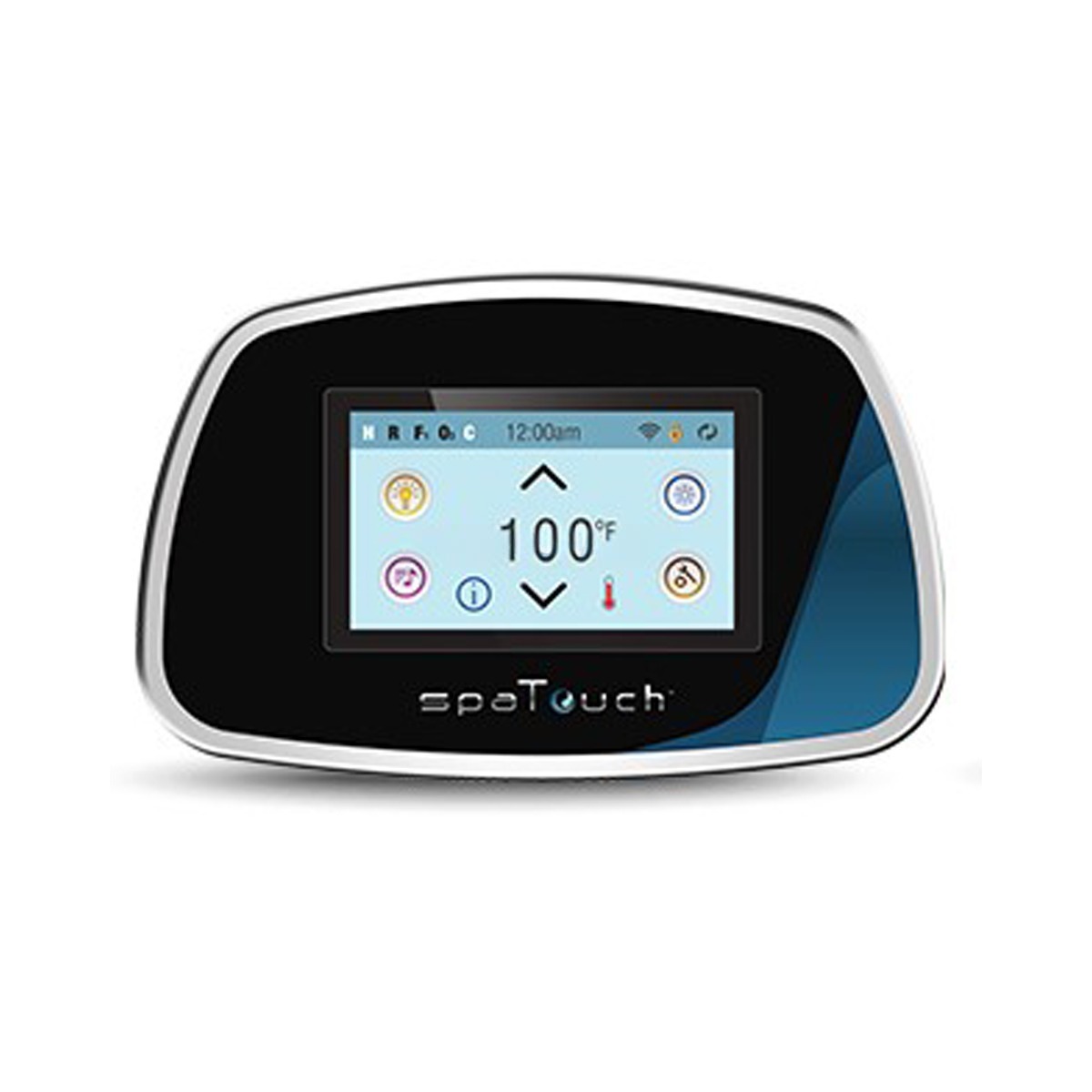
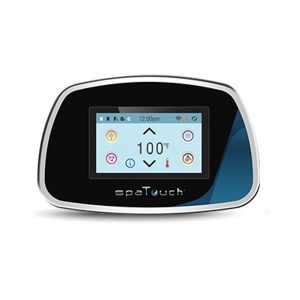
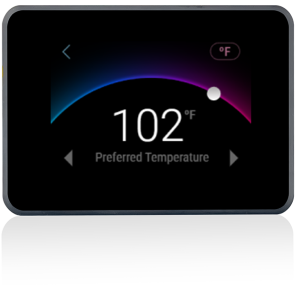
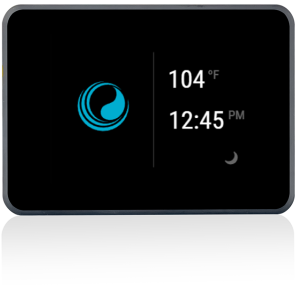
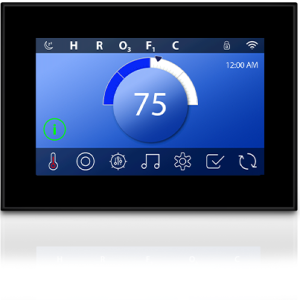
The Balboa SpaTouch 2 (Trapezoid Design) is an award-winning, icon-driven touchscreen topside control panel designed for use with Balboa BP Series spa pack systems. Featuring a resistive touchscreen that looks and feels like a glass display, this panel transforms the user experience with modern, minimal aesthetics and powerful functionality.
The SpaTouch 2 provides full control over jets, lighting, music, and temperature settiWi-fi ngs through an intuitive touch interface. Built with high-quality, impact-resistant materials, the panel is impervious to splashes and environmental contamination, making it ideal for the demanding spa environment. Wi-Fi enabled as standard, the SpaTouch 2 also supports integration with the Balboa Clim8zone heat pump system. Whether you are replacing a faulty topside or upgrading your spa’s control interface, the SpaTouch 2 delivers a premium user experience with its customisable, modern design.
✨ Key Features
- ✅ Resistive Touchscreen Display – Icon-driven interface that looks and feels like glass – effortless, intuitive spa control
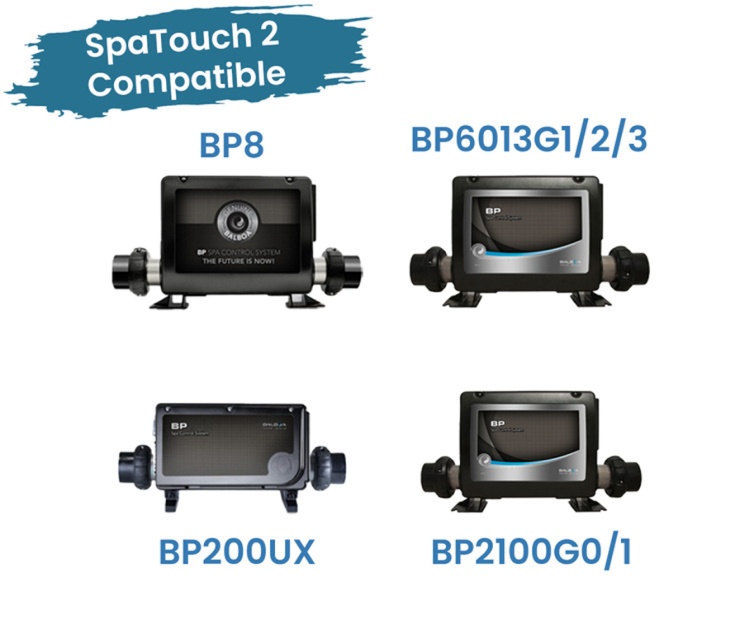
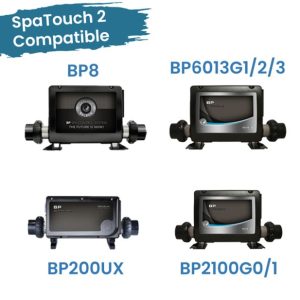
- ✅ Compatible with All Balboa BP Series Systems – Works with BP systems supporting TP800 and/or TP900 topsides – broad compatibility
- ✅ Wi-Fi Enabled – Built-in Wi-Fi connectivity indicator – ready for smart spa integration
- ✅ Jets, Lights, Music & Temperature Control – Full command of all spa functions from a single panel – complete control at your fingertips
- ✅ Impact-Resistant Construction – High-quality, durable materials – built to withstand the spa environment
- ✅ Impervious to Splashes & Contamination – Sealed design protects against water and debris – reliable long-term performance
- ✅ Clim8zone Heat Pump Compatible – Seamless integration with Balboa’s Clim8zone system – energy-efficient heating control
- ✅ Multi-Language Support – English, French, Spanish, German, Italian, Czech, and Swedish – accessible for all users
- ✅ Customisable Sleep Timer – Adjustable from 1 to 60 minutes – personalise your display behaviour
- ✅ Panel & Settings Lock – Dual lock functionality prevents unwanted changes – peace of mind for all spa owners
- ✅ Award-Winning Design – Modern, minimal trapezoid form factor – a stylish addition to any spa
⚙️ Technical Specifications
| Specification | Value |
|---|---|
| Compatible System | Balboa BP Series (systems supporting TP800 and/or TP900) |
| Part Number (MPN) | 57324-03 |
| Complete Topside MPN | 57220 |
| Naked Topside MPN | 57219 |
| Topside Series | SpaTouch |
| Display Type | Resistive Touchscreen |
| Controls | Jets, Lights, Music, Temperature |
| Wi-Fi Enabled | Yes |
| Panel Dimensions | 200 × 120 mm (as listed) / 198 × 124 mm (specification detail) |
| Overlay MPN | 13668 |
| Temperature Range (High) | 26.7°C to 40°C (80°F to 104°F) |
| Temperature Range (Low) | 10°C to 37.2°C (50°F to 99°F) |
| Temperature Display | °C or °F (user selectable) |
| Clock Display | 12-hour or 24-hour (user selectable) |
| Sleep Timer | Adjustable 1–60 minutes (default 30 minutes) |
| Languages | English, French, Spanish, German, Italian, Czech, Swedish |
| Colour | Black |
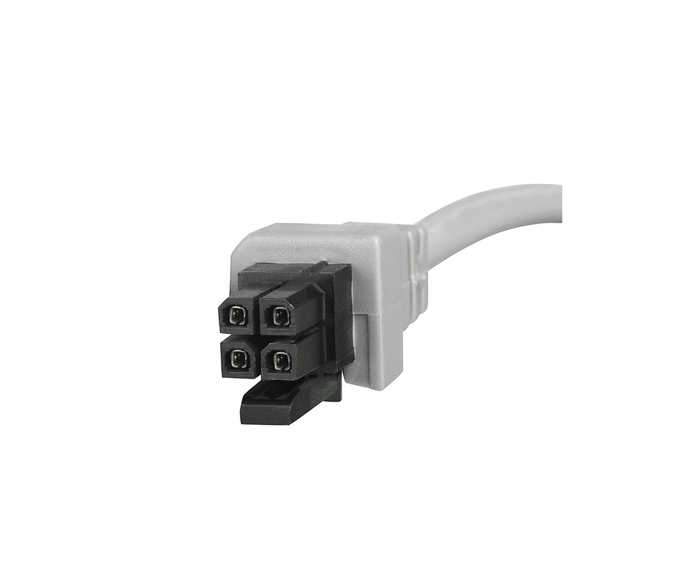
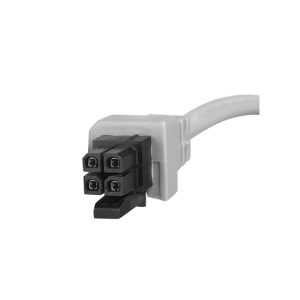
| Connector Type | Refer to connector diagram in Downloads section below |
| Design | Trapezoid |
| Minimum Mounting Angle | 10° |
🔌 Compatibility Guide
This Topside Control is Compatible With:
| Spa Pack System | Compatibility Level | Confirmed |
|---|---|---|
| Balboa BP Series (supporting TP800 and/or TP900) | Full Compatibility | ✅ |
| Balboa BP Series (supporting only TP400 and/or TP600) | Partial – some screens may not display correctly | ⚠️ |
| Balboa Clim8zone Heat Pump | Compatible | ✅ |
NOT Compatible With:
- ❌ Non-Balboa spa pack systems
- ❌ Balboa systems that do not support BP Series topside connections
How to Verify Compatibility:
📍 Check your existing topside for the part number printed on the unit or label
📍 Check your spa pack model number (usually found on the control box inside the spa cabinet)
📍 Confirm your system is a Balboa BP Series that supports TP800 and/or TP900 topsides
📍 Compare the connector type using the diagram available in the Downloads section
⚠️ Important: Topside controls are system-specific. Installing an incompatible topside will not work and may cause error codes. If your BP system supports only the TP400 and/or TP600, the SpaTouch 2 will partially function but some screens may not display correctly.
🎛️ Button Functions & Controls
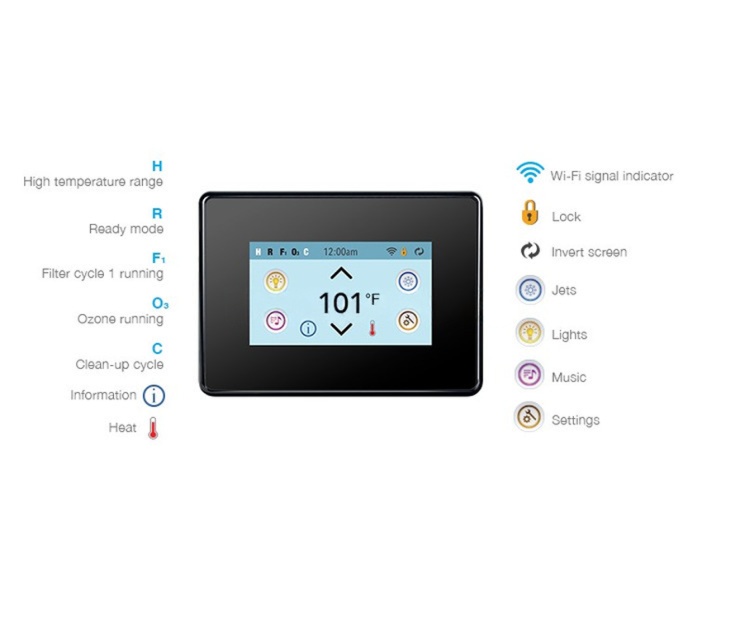
The SpaTouch 2 uses an icon-driven touchscreen interface rather than physical buttons. All functions are accessed by touching icons on the display.
| Touchscreen Icon | Function |
|---|---|
| Jets | Controls spa pumps – tap once for low speed, tap again for high speed (if configured) |
| Lights | Toggles the main spa light on and off |
| Music | Accesses music control features |
| Temperature Up / Down | Displays and adjusts the set temperature |
| Settings | Opens the settings menu for programming and configuration |
| Spa Equipment | Accesses the full spa equipment control screen for all installed devices |
| Heat Mode | Switches between Ready and Rest modes; selects High or Low temperature range |
| Filter Cycle | View and programme filter cycle 1 and optional filter cycle 2 |
| Lock | Press and hold for 5+ seconds to lock or unlock Panel and/or Settings |
| Hold Mode | Disables pumps for servicing (lasts 1 hour) |
| Invert Screen | Flips the display orientation |
| Back | Returns to the previous screen |
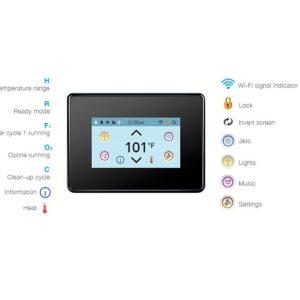
Display Information:
| Display Element | Shows |
|---|---|
| Current Water Temperature | Real-time water temperature (after 1 minute of pump operation) |
| Set Temperature | Desired target temperature (flashing °F/°C indicates adjustment mode) |
| Mode Indicator | H (High Range), L (Low Range), R (Ready), RR (Ready/Rest) |
| Filter Status | F1 (Filter Cycle 1), F2 (Filter Cycle 2), F+ (Both running) |
| Ozone Status | O3 icon when ozone generator is running |
| Wi-Fi Indicator | Shows Wi-Fi link connection status |
| Lock Icon | Indicates Panel or Settings lock is active |
| Clean-up Cycle | C icon when clean-up cycle is running |
| Message Indicator | Error, Warning, Reminder, or Information icons at bottom of screen |
🛠️ Installation Guide
Before Installation:
- ⚠️ Disconnect power to the spa at the isolator/breaker before any work
- ⚠️ Verify compatibility with your Balboa BP Series spa pack
- ⚠️ Download and print the cutout template from the Downloads section below
- ⚠️ Verify cable length is sufficient for your installation
Installation Steps:
- Turn off power at the isolator/breaker
- Remove the existing topside panel from the spa shell
- Disconnect the cable from the spa pack
- Compare the new connector with the existing one to confirm compatibility
- Connect the new SpaTouch 2 cable to the spa pack
- Position the panel in the cutout, ensuring the correct mounting angle
- Secure the panel in position
- Restore power and the panel will enter the start-up sequence followed by Priming Mode
Mounting Requirements:
| Requirement | Specification |
|---|---|
| Minimum Mounting Angle | 10° (panel must not be flat) |
| Installation Location | Exterior portion of the spa tub, away from the spa water |
| Spa Cover Clearance | Spa cover must not contact the touchscreen surface when closed |
| Cutout Dimensions | Refer to the cutout template PDF in Downloads section |
⚠️ Important: The panel must be installed on the exterior portion of the spa tub. Installing on the interior portion next to the spa water may void the warranty. A minimum 10° angle is required for proper operation and drainage.
⚠️ Professional installation recommended if you are unfamiliar with spa electronics.
⚡ Wiring & Connection
Connector Information:
| Specification | Detail |
|---|---|
| Connector Type | Refer to connector diagram (see Downloads section or product images) |
| Cable Length | Please refer to manufacturer documentation or contact Parts4Tubs for details |
Connection Notes:
The SpaTouch 2 connects directly to the Balboa BP Series spa pack via its dedicated topside connector port. The connector type is shown in the diagram image available on the product page and in the Downloads section.
⚠️ Never force the connector. If it does not fit, verify compatibility with your spa pack model.
🔍 Troubleshooting
Common Issues:
| Problem | Possible Cause | Solution |
|---|---|---|
| Blank display | No power / loose cable connection | Check power supply and reseat the topside cable at the spa pack |
| Display shows “—-“ | Temperature unknown – pump not yet running | Allow 1 minute of water flow for temperature to register |
| Touchscreen unresponsive | Panel in sleep mode | Touch anywhere on the screen to wake the panel |
| Panel locked | Panel lock enabled | Press and hold the Lock icon for 5+ seconds to unlock |
| Error/Warning icon at bottom | System message from spa pack | Touch the indicator to view the message details |
| “Communications error” | Panel not receiving data from system | Check cable connection; call for service if persistent |
| Partial display / incorrect screens | BP system supports only TP400/TP600 | This panel requires a BP system supporting TP800/TP900 for full functionality |
| Priming Mode on start-up | Normal after power-up | Follow priming procedure: activate pumps to prime, then exit or wait 4-5 minutes |
Error Codes:
Error codes and messages are determined by the spa pack, not the topside panel itself. The SpaTouch 2 displays messages from the BP Series system, including heater-related faults, sensor faults, flow issues, and system reminders. Refer to your spa pack manual for specific error code meanings, or consult the User Guide PDF in the Downloads section for a full list of message codes (M015–M037).
🔧 Maintenance & Care
Routine Care:
| Task | Frequency |
|---|---|
| Wipe touchscreen with a soft, damp cloth | Weekly |
| Check touchscreen responsiveness | Monthly |
| Inspect cable connection at spa pack | Annually |
| Verify mounting angle and seal integrity | Annually |
DO NOT:
- ❌ Use abrasive cleaners on the touchscreen
- ❌ Submerge the panel in water
- ❌ Use solvent-based or chemical cleaners on the display
- ❌ Press the touchscreen with sharp or hard objects
- ❌ Allow the spa cover to contact the touchscreen surface
Overlay Information:
The SpaTouch 2 Trapezoid uses overlay MPN 13668. If the overlay becomes worn, faded, or the touchscreen response is affected, a replacement overlay may be available separately. Contact Parts4Tubs for availability.
🎯 Ideal Applications
| Application | Suitability |
|---|---|
| ♨️ Direct replacement for faulty SpaTouch 2 topside | ✅ Ideal |
| ♨️ Upgrade from TP800 or TP900 button-style topside | ✅ Compatible (on BP systems supporting TP800/TP900) |
| ♨️ Spas with Balboa BP Series control systems | ✅ Full compatibility |
| ♨️ Integration with Balboa Clim8zone heat pump | ✅ Compatible |
Common Replacement Scenarios:
- Cracked or damaged touchscreen display
- Unresponsive touch interface
- Water damage to existing topside
- Upgrading from a traditional button-style topside to touchscreen
- Worn or faded overlay affecting touch response
💬 Frequently Asked Questions
Q: How do I know if this topside is compatible with my spa? A: The SpaTouch 2 is compatible with all Balboa BP Series systems that support the TP800 and/or TP900 topsides. Check your spa pack model number on the control box inside your spa cabinet. If your system only supports the TP400 or TP600, this panel will partially work but some screens may not display correctly. Contact Parts4Tubs if you are unsure.
Q: Is the overlay included? A: The overlay (MPN 13668) is part of the complete topside assembly (MPN 57220). For the naked topside without overlay, the MPN is 57219. Please confirm which version you are ordering. Contact Parts4Tubs for clarification.
Q: What is the cable length? A: Please refer to the manufacturer documentation or contact Parts4Tubs to confirm the cable length for this model before ordering.
Q: Will this display error codes? A: Yes, the SpaTouch 2 displays all error messages, warnings, reminders, and information messages from the BP Series spa pack. Message codes range from M015 to M037 and cover heater faults, sensor issues, flow problems, and system alerts. Refer to your spa pack manual or the User Guide PDF for specific meanings.
Q: Can I install this myself? A: If you are comfortable working with spa electronics and can safely isolate the power supply, DIY installation is possible. The panel requires a minimum 10° mounting angle and must be installed on the exterior portion of the spa tub. Professional installation is recommended if you are unfamiliar with spa electrical systems.
Q: Does the panel support Wi-Fi? A: Yes, the SpaTouch 2 is Wi-Fi enabled. A Wi-Fi indicator icon on the main screen shows the connection status.
Q: Can I change the language on the display? A: Yes, the SpaTouch 2 supports seven languages: English, French, Spanish, German, Italian, Czech, and Swedish. The language can be changed through the Settings menu.
Q: What happens when the display goes dark? A: The SpaTouch 2 enters sleep mode after a period of inactivity (default 30 minutes, adjustable from 1 to 60 minutes). Simply touch anywhere on the screen to wake the panel. This is normal operation and helps extend the display life.
Q: What is the difference between Ready and Rest mode? A: In Ready mode, the spa maintains the set temperature at all times by periodically circulating water (polling every 30 minutes). In Rest mode, the spa only heats during programmed filter cycles, which can reduce energy consumption.
📥 Downloads & Resources
📄 User Guide – Complete user interface and programming reference for SpaTouch 1 & 2
📄 Installation Guide – Installation instructions for SpaTouch 2, 2C, 3, and 3+
📄 Cutout Template – Print at actual size for precise cutout dimensions
🏆 Why Choose the Balboa SpaTouch 2 (Trapezoid)
- ✅ Full BP Series Compatibility – Works with all BP systems supporting TP800/TP900 topsides
- ✅ Award-Winning Touchscreen Interface – Resistive touchscreen with the look and feel of glass
- ✅ Built to Last – Impact-resistant materials impervious to splashes and contamination
- ✅ Wi-Fi Ready – Built-in wireless connectivity for smart spa integration
- ✅ Comprehensive Control – Jets, lights, music, temperature, filtration, and diagnostics all in one panel
- ✅ Multi-Language – Seven languages included as standard for international accessibility
- ✅ Clim8zone Compatible – Seamlessly integrates with Balboa’s energy-efficient heat pump system
🤝 Why Buy from Parts4Tubs
- ✅ UK-based company with local support
- ✅ Fast UK delivery
- ✅ Expert advice from spa specialists
- ✅ Compatibility assistance available – contact us with your spa pack model number
- ✅ Full warranty support
- ✅ Easy returns within 30 days
- ✅ Replacement overlays and accessories available
⭐ Summary
The Balboa SpaTouch 2 (Trapezoid Design) is an award-winning touchscreen topside control panel compatible with all Balboa BP Series systems supporting TP800 and/or TP900 topsides. Featuring a resistive touchscreen, Wi-Fi connectivity, multi-language support, and full control of jets, lights, music, and temperature, it delivers a premium spa experience in a durable, splash-proof design. Order today from Parts4Tubs for fast UK delivery and expert compatibility support.
Related products
Balboa TP Series - Topside Panels
Balboa TP540 Topside Control Panel – Replacement for Legacy TP540, TP400 & TP400W Models
Control Boxes, Spa Packs & Topside Controls
Control Boxes, Spa Packs & Topside Controls
Control Boxes, Spa Packs & Topside Controls
Balboa SpaTouch Mini Topside Control Panel – Compatible with Balboa BP Series
Balboa TP Series - Topside Panels
Control Boxes, Spa Packs & Topside Controls
Control Boxes, Spa Packs & Topside Controls
Control Boxes, Spa Packs & Topside Controls