
Balboa TP500S Topside Panel
£89.84 Inc VAT
Out of stock
Want to be notified when this product is back in stock?
 Balboa TP500S Topside Control Panel – Compatible with BP Series Systems
Large-format 6-button control with menu functionality for complete spa management
 Product Overview
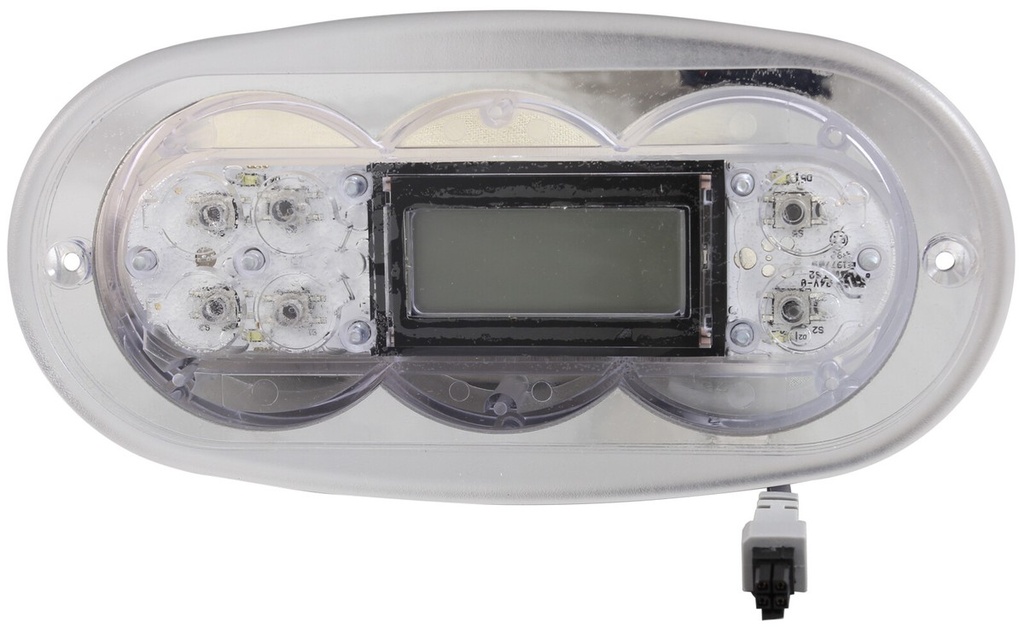
The Balboa TP500S is a large-format 6-button topside control panel designed for use with Balboa BP Series spa systems. This panel provides comprehensive control of temperature, jets, lighting, and auxiliary functions, with the added convenience of dedicated WARM, COOL, and MENU buttons for intuitive spa management.
Featuring a Serial Standard style screen with 4 large digits in a horizontal line and scrolling text capability, the TP500S delivers clear visibility of spa settings and status information. The panel operates on 12V and connects via 4 black plastic pins in a grid formation.
The TP500S is compatible with Balboa BP Series systems such as BP601 and BP2100, making it an ideal replacement for faulty or damaged topside controls. The overlay is included for immediate installation.
 Key Features
 6-Button Configuration – WARM, COOL, MENU, LIGHT, JETS, and AUX controls
- Menu Access – Dedicated MENU button for system settings
- Temperature Controls – Separate WARM and COOL buttons for precise adjustment
- 12V Operation – Safe low-voltage control panel
- Serial Standard Display – 4 large digits with scrolling text
- Large Format Design – 181 mm × 89 mm panel size for enhanced visibility
- BP Series Compatible – Works with Balboa BP601, BP2100 and similar
- 4-Pin Grid Connection – Secure connection via 4 black plastic pins
- Overlay Included – Ready for immediate installation
 Technical Specifications
| Specification | Value |
|---|---|
| Brand | Balboa |
| Model / Series | TP |
| Product Type | Topside Panel |
| Compatible System | Balboa BP Series (BP601, BP2100) |
| Operating Voltage | 12V |
| Number of Buttons | 6 |
| Button Configuration | WARM, COOL, MENU, LIGHT, JETS, AUX |
| Max Pumps | 1 |
| Blower / Aux | 1 |
| Display Type | Serial Standard style |
| Display Features | 4 large digits, horizontal line, scrolling text |
| Panel Length | 181 mm |
| Panel Width (Height) | 89 mm |
| Connection Type | 4 black plastic pins in grid formation |
 Compatibility Guide
This Topside Control is Compatible With:
| Spa Pack Model | Series | Confirmed |
|---|---|---|
| BP601 | BP600 | |
| BP2100 | BP2100 | |
 Important: The TP500S works with Balboa BP Series systems. Check your spa pack model number to confirm compatibility before ordering.
How to Verify Compatibility:
 Check your spa pack model number in the equipment compartment Confirm your system is a Balboa BP Series Check the part number on your existing topside Contact Parts4Tubs if you require assistance
 Button Functions & Controls
| Button | Function |
|---|---|
| WARM | Increase water temperature |
| COOL | Decrease water temperature |
| MENU | Access system settings and configuration |
| LIGHT | Toggle spa lighting on/off |
| JETS | Control jet pump operation |
| AUX | Control auxiliary device (Pump 2 or Blower) |
Display Information:
| Display Element | Shows |
|---|---|
| 4-Digit Display | Current/set water temperature |
| Scrolling Text | Status messages, menu options, and error codes |
| Horizontal Layout | Clear visibility of readings |
 Installation Guide
Before Installation:
- Disconnect power to the spa at the isolator or circuit breaker
- Verify the TP500S is compatible with your Balboa BP Series spa pack
- Note: This product is discontinued – consider TS-TP502 for future replacements
Panel Dimensions for Mounting:
| Dimension | Measurement |
|---|---|
| Panel Length | 181 mm |
| Panel Width | 89 mm |
General Installation Steps:
- Turn off power at the main isolator
- Remove the existing topside panel
- Disconnect the old cable from the spa pack (4-pin grid connection)
- Connect the new TP500S panel to the spa pack
- Mount the new panel in position
- Ensure overlay is properly positioned
- Restore power and test all functions
Professional installation is recommended if you are unfamiliar with spa electrical systems.
 Wiring & Connection
Connector Information:
| Specification | Detail |
|---|---|
| Connection Type | 4 black plastic pins in grid formation |
| Operating Voltage | 12V |
Never force the connector. If resistance is encountered, verify you have the correct orientation and compatible spa pack.
 Troubleshooting
Common Issues:
| Problem | Possible Cause | Solution |
|---|---|---|
| Blank display | No power to spa pack | Check isolator and circuit breaker |
| Blank display | Loose connection | Verify connector is fully seated |
| Error codes displayed | Spa pack fault | Refer to spa pack manual |
| Buttons unresponsive | Overlay wear | Check overlay condition |
| AUX not working | Configuration issue | Verify pump/blower wiring |
| MENU not responding | System configuration | Check spa pack settings |
Display Messages:
The scrolling text display shows status messages and error codes from your spa pack. Refer to your BP Series spa pack manual for specific error code definitions.
 Maintenance & Care
Routine Care:
| Task | Frequency |
|---|---|
| Wipe panel with soft damp cloth | Weekly |
| Check button responsiveness | Monthly |
| Inspect cable connection | Annually |
| Check overlay condition | Annually |
DO NOT:
 Use abrasive cleaners or scouring pads
- Apply solvents or chemical cleaners
- Submerge the panel in water
- Press buttons with sharp objects
 Ideal Applications
| Application | Suitability |
|---|---|
 Hot tub systems requiring menu access Hot tub systems requiring menu access |
Ideal |
| Spas with pump and blower configurations |
Ideal |
| BP601 systems |
Compatible |
| BP2100 systems |
Compatible |
| Users preferring larger display panels |
Ideal |
Common Replacement Scenarios:
- Replacing faulty or damaged TP500S panel
- Worn or unresponsive overlay
- Display malfunction
- Water damage replacement
 Frequently Asked Questions
Q: Is this product still available? A: This product has been DISCONTINUED BY BALBOA. Limited stock may still be available. When stock runs out, please use TS-TP502 as the replacement.
Q: What is the replacement for the TP500S? A: Balboa recommends using the TS-TP502 when the TP500S is no longer available.
Q: How do I know if this topside is compatible with my spa? A: The TP500S is compatible with Balboa BP Series spa packs such as BP601 and BP2100. Check your spa pack model number to confirm compatibility.
Q: Is the overlay included? A: Yes, the overlay is included with this panel.
Q: What are the panel dimensions? A: The panel measures 181 mm in length and 89 mm in width (height).
Q: What is the difference between TP500 and TP500S? A: The TP500S is the larger format version. The TP500 measures 160 mm × 57 mm while the TP500S measures 181 mm × 89 mm.
Q: What type of display does this panel have? A: The TP500S has a Serial Standard style screen with 4 large digits in a horizontal line and scrolling text capability.
Q: Can I install this myself? A: If you are comfortable working with spa electronics and can safely isolate power, DIY installation is possible. However, professional installation is recommended if you are unfamiliar with spa systems.
 Why Choose the Balboa TP500S
- 6-Button Design – Comprehensive control with MENU access
- Large Format Panel – Enhanced visibility at 181 mm × 89 mm
- Separate Temperature Buttons – WARM and COOL for precise adjustment
- Clear Display – 4 large digits with scrolling text
- Menu Functionality – Access system settings easily
- Overlay Included – Ready for immediate installation
- 12V Operation – Safe low-voltage control
- BP Series Compatibility – Works with BP601, BP2100 and similar
- Genuine Balboa Product – Quality you can trust
 Why Buy from Parts4Tubs
- UK-based company with local customer support
- Fast UK delivery on in-stock items
- Expert advice from hot tub and spa specialists
- Compatibility assistance available
- Full warranty support and after-sales service
- Easy returns within 30 days
- Genuine Balboa products
- Replacement parts (TS-TP502) available when this product runs out
 Summary
The Balboa TP500S is a large-format 6-button topside control panel designed for Balboa BP Series spa systems. Features WARM, COOL, MENU, LIGHT, JETS, and AUX buttons with a Serial Standard style display showing 4 large digits and scrolling text. Compatible with BP601, BP2100 and similar BP Series systems. Large panel dimensions of 181 mm × 89 mm for enhanced visibility. Operates on 12V with 4 black plastic pins grid connection. Overlay included for immediate installation.
Related products
Control Boxes, Spa Packs & Topside Controls
Control Boxes, Spa Packs & Topside Controls
Control Boxes, Spa Packs & Topside Controls
Control Boxes, Spa Packs & Topside Controls
Control Boxes, Spa Packs & Topside Controls
Control Boxes, Spa Packs & Topside Controls
Control Boxes, Spa Packs & Topside Controls
Control Boxes, Spa Packs & Topside Controls